BORNLI / product decisions
A purchase requisition app that keeps approval separate from buying
A purchase requisition app should capture what an employee needs, who will pay for it and who can authorize the spend. Keep an approved request separate from a purchase order that has actually been created and sent.
Find the gap between needing something and authorizing the spend
A purchase requisition app gives employees a clear way to request a purchase and gives the responsible manager a specific amount to approve. Its useful output is a complete, authorized request that a buyer can act on, with a visible owner at every stage.
Check the purchasing system you already use. Microsoft documents requisition workflows in Dynamics 365 that can route either a whole request or its individual lines for review. An approved requisition can then be used to generate a purchase order. These are separate stages; the documentation describes a configurable Microsoft product, not a completed BORNLI integration.
A custom app is worth considering when employees struggle with the existing interface or the workflow crosses tools that cannot show one reliable status. If the current system can handle the request, approval and buyer handoff, configuring it may be enough. Avoid making a second purchasing ledger merely to replace an email form.
The following illustrative scenario is a BORNLI concept demo, not a customer implementation. The request, people, prices and approval rule are fictional. Three screens follow an internal equipment request before any supplier order is placed.
Capture a request that the next person can evaluate
Employee Maya creates PR-218 for four scanner cradles at an estimated $85 each. The request totals $340 before tax and shipping, names cost center OPS-02 and gives a need date of December 4. The reason is specific: replace damaged charging cradles at the packing station.
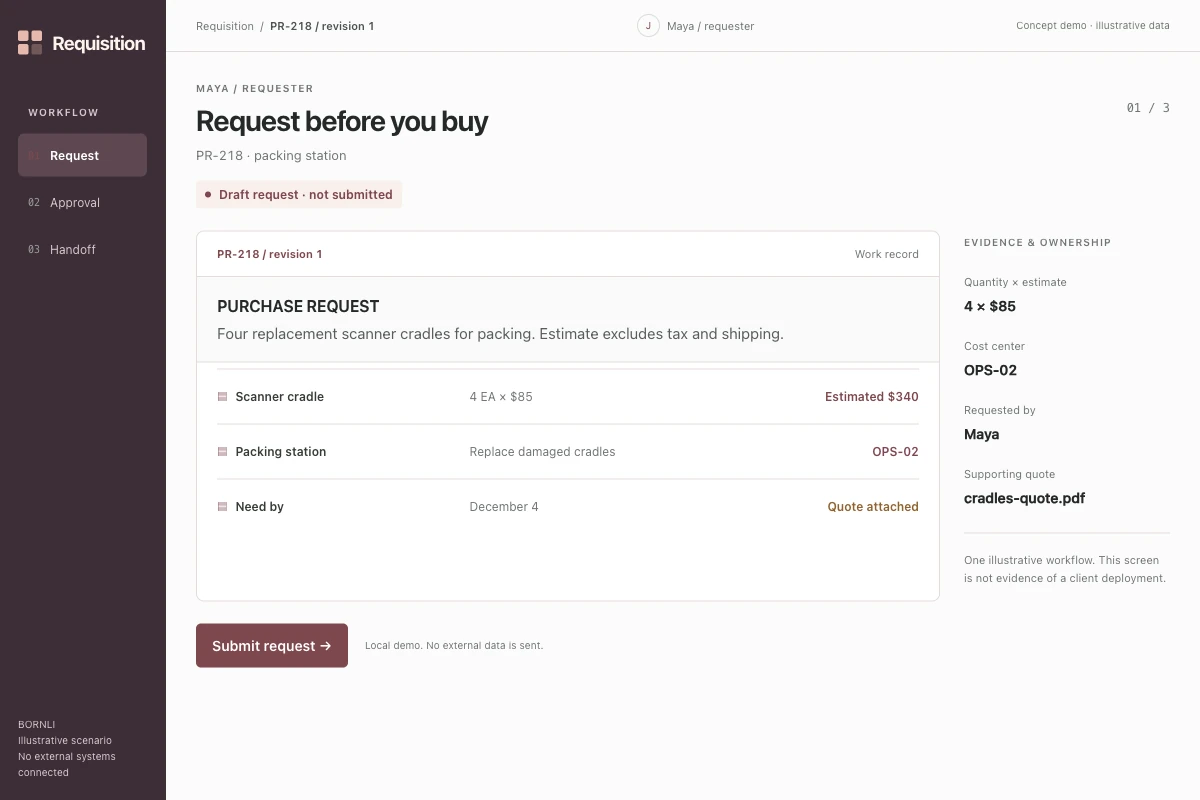
The employee attaches the supplier quote and chooses the receiving location. The app saves the quantity, currency, estimate basis and document together as revision 1. The estimate is not a supplier commitment or a confirmed final purchase price.
Keep required fields tied to real decisions. A manager needs the reason and spend owner; a buyer needs a usable item description, destination and supporting quote. Ask about an existing asset or stock item before creating a new purchase, if that check belongs to the organization's process.
The first submission should receive a server-side request identifier. If an employee taps Submit again after a slow connection, show the same request and its receipt. A second tap should not silently create a second purchase request.
Approve a revision, not a moving target
The model policy routes PR-218 to the OPS-02 budget owner because the $340 estimate exceeds the employee's illustrative $250 limit. The manager sees four cradles, $85 per item, the quote and the reason. Approval applies to revision 1 and its $340 estimate.
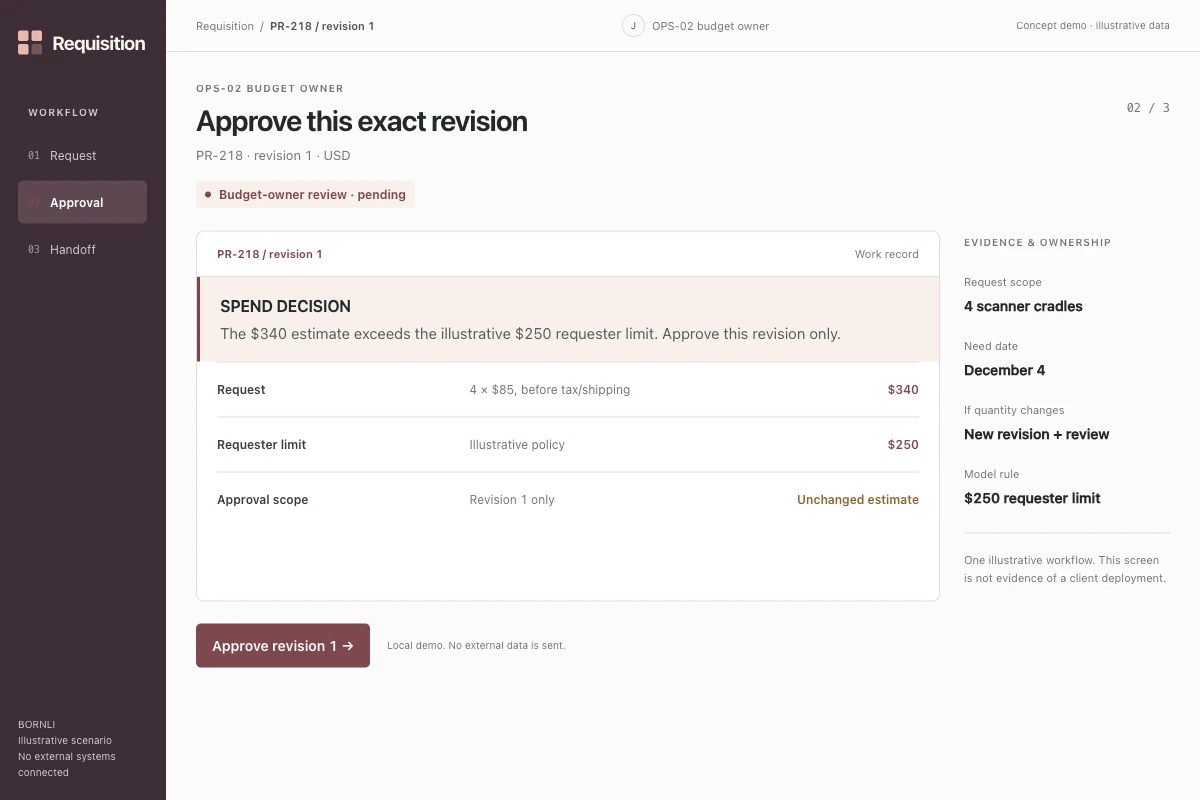
The threshold is a scenario input, not recommended policy. Use the organization's actual authority matrix, including who can delegate and when a second approval is needed. A missing manager should route to an authorized substitute or remain visibly blocked; it should not turn into automatic approval.
If the buyer later discovers that five cradles are needed, the estimate becomes $425. That is a new revision requiring the configured review. Preserve the old decision in history, but do not let its green Approved label authorize a different amount. Decide explicitly whether tax and shipping can increase the amount within an agreed limit or also require renewed approval.
Return for changes, reject and approve need different meanings. A returned request remains editable and linked to its earlier discussion. A rejected request should explain the decision. Neither state should appear in a ready-to-buy queue.
Tell the employee whether it is approved, assigned or ordered
After approval, PR-218 revision 1 is delivered to the purchasing queue. In the concept, receipt BUY-491 confirms that buyer Alex owns the request. The employee sees Approved — buyer assigned. The purchase-order field still says Not created.
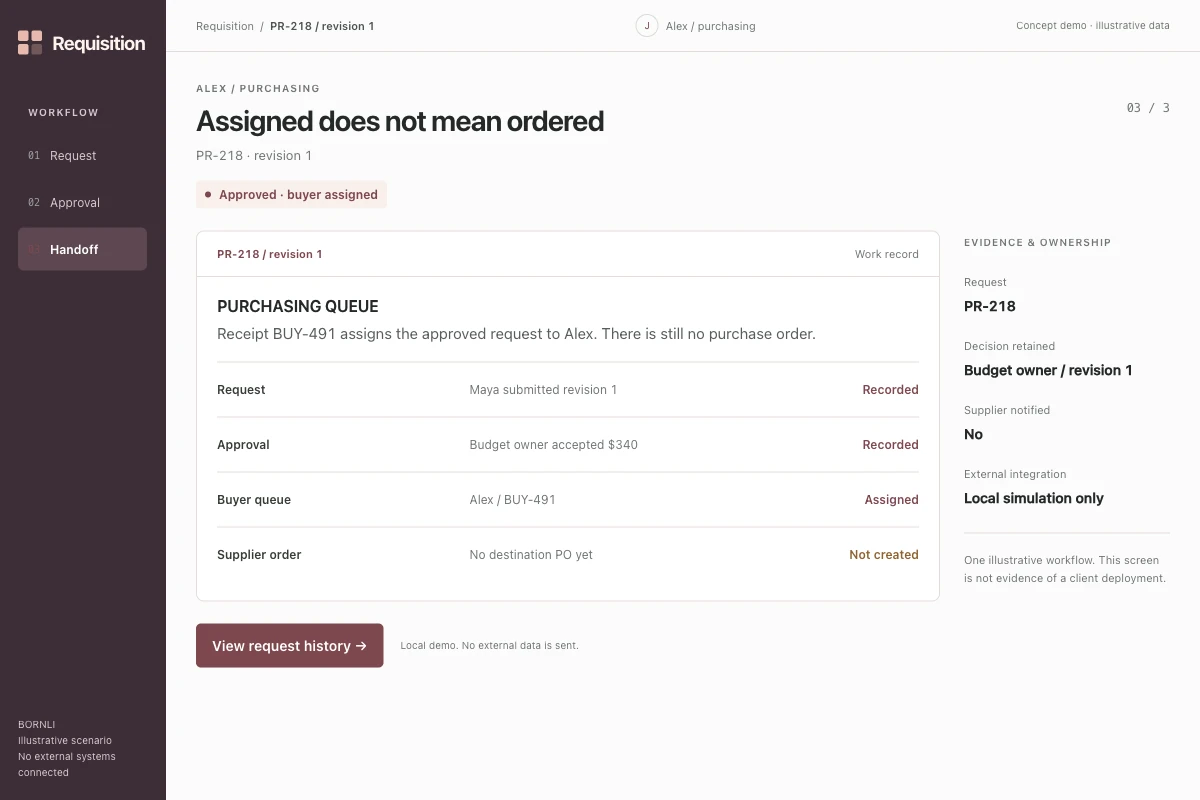
This distinction prevents a common misunderstanding: a manager's approval is permission to proceed, not evidence that the supplier has received an order. When the buyer creates a PO, the requisition should link to that destination record. If sending the PO is a separate operation, give that operation its own status.
Keep the request revision, approval decision and buyer receipt together. If the handoff times out, reconcile the original identity before attempting delivery again. If the destination rejects the request, show the reason and an owner who can fix it rather than leaving a permanent Sending label.
The local demo models one purchasing queue; it does not connect to an ERP or send an order. The production design needs to agree what each destination status means, how canceled requests are handled and which system owns the authoritative amount.
Release one purchasing path before adding every exception
Start with one department, one currency and a known class of non-stock purchases. Keep request creation, manager approval and buyer handoff in scope. Supplier negotiations, invoice matching and stock receipt can remain in their existing tools.
- Authority: a request on each side of the real approval threshold must reach the correct reviewer.
- Changed amount: changing four units to five after approval must create a new revision and follow the configured review rule.
- Unavailable reviewer: a delegated task must show the authorized substitute and retain the original assignment.
- Repeated submission: a slow response and a second tap must produce one request and one buyer-queue entry.
- Status meaning: an approved request without a PO must never appear as ordered.
Measure incomplete requests, approval waiting time, returned revisions and employee status inquiries. Include the buyer's effort when comparing the new flow with the old one. These are proposed observations, not savings demonstrated by the concept.
For a build-versus-buy assessment, bring a current request, approval matrix, typical quote and the purchasing system's handoff requirements. BORNLI can scope the smallest interface that resolves that gap. The existing asset handover workflow covers a later custody decision, after equipment exists; it should not be mixed into spend approval.
Map the workflow before building it.
Tell us what your team handles manually, which tools you use, and where the process gets stuck. Start by email.
Discuss your workflow ↗