BORNLI / product decisions
A machine downtime tracking app for reliable shift records
A machine downtime tracking app should connect the actual stop interval to an operator’s explanation and a supervisor’s review. Keep timestamps, reason classification and the running signal separate so a corrected reason cannot rewrite production history.
Start with the missing handoff on the shop floor
A machine downtime tracking app is useful when a stop appears in a monitoring system but its explanation stays on a paper sheet or in someone’s memory. The app should join those records while keeping their evidence separate: when the machine stopped, why the operator thinks it stopped, and who confirmed the classification.
Check the tools you already have first. Tulip’s Machine Monitoring Terminal, for example, documents machine selection, state monitoring and assigning a reason to a down state. If an existing platform covers your workcell and reporting process, configuring it may be enough. A custom app is worth considering when the unresolved gap is a specific operator task, offline capture or supervisor handoff.
The example below is a BORNLI concept demo with fictional machine events. It is a recordkeeping interface, not a machine-control or safety system. It does not start equipment or replace the site’s operating procedures. Part measurements and quality disposition belong to a different workflow, described in our manufacturing quality inspection app guide.
Capture the stop before asking for the perfect explanation
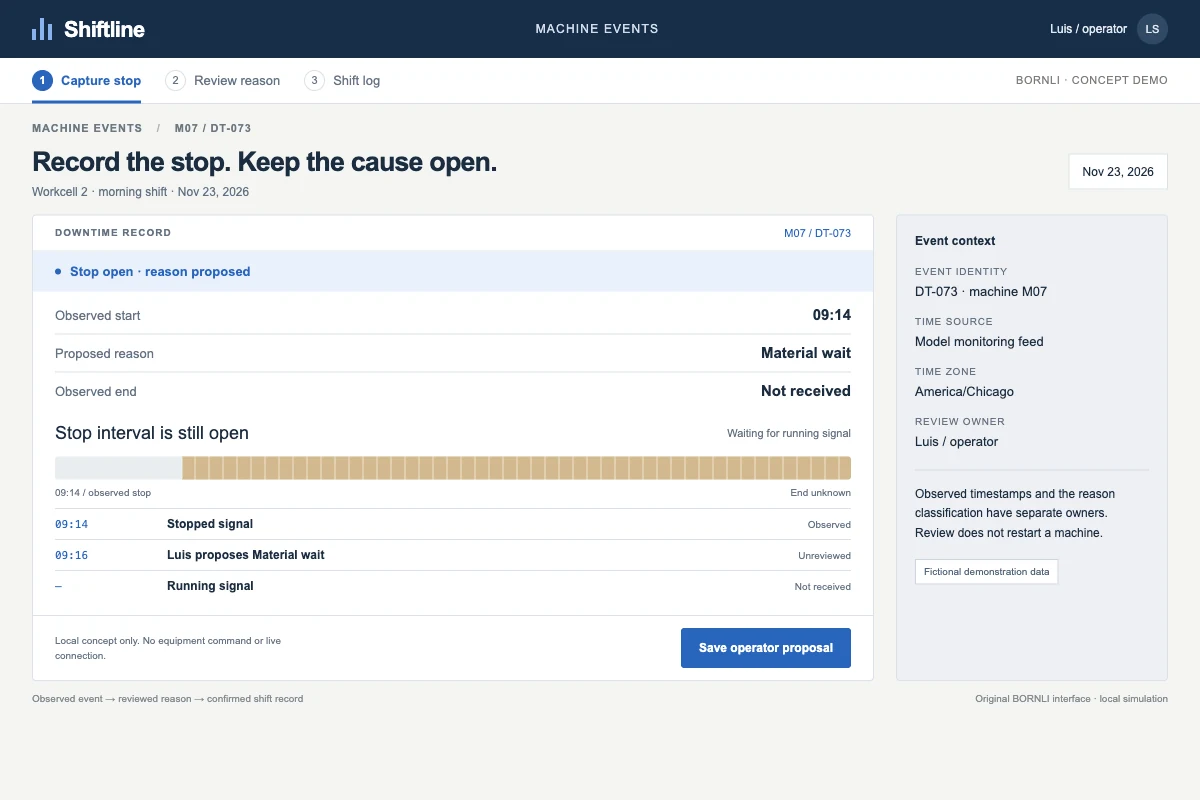
In the illustrative scenario, machine M07 enters a stopped state at 09:14. The monitoring event creates record DT-073. Operator Luis suggests Material wait and adds a short note: the next material cart has not arrived. That explanation is a proposed reason, not a fact established by the machine signal.
Keep the raw event time, its source and the time zone. A manual correction needs its own author and explanation. If the app only has a manual report, label it as one; do not present the operator’s later entry time as a measured stop time. An event with an unknown start can still be useful, provided the missing value remains visible.
- Machine identity: M07 in workcell 2, with a stable event ID.
- Observed start: 09:14 from the model monitoring feed.
- Operator proposal: Material wait, entered by Luis.
- Closure: pending until a separate running event or authorized correction establishes the end.
Keep the operator’s action short enough for the work: choose a reason, add evidence if needed, and save. A local save should remain visibly queued while connectivity is unavailable.
Review the reason without rewriting the interval
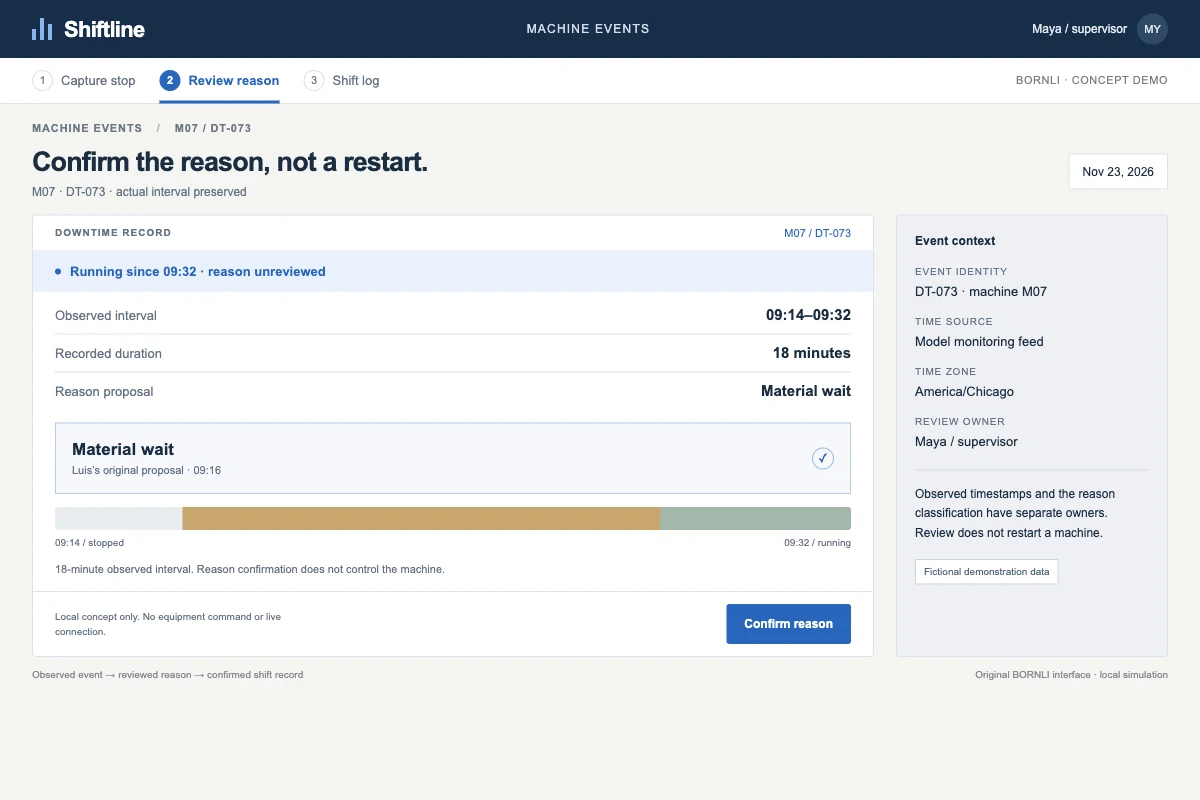
The next model event says M07 is running at 09:32. The recorded stop interval is therefore 18 minutes: 09:32 minus 09:14. This is a single illustrative interval, not an estimate of lost output, avoidable downtime or savings.
Supervisor Maya reviews Luis’s explanation and confirms Material wait. Her decision changes the classification status; it does not change the two observed times. The interface shows the machine’s running signal separately from the reason-review action. Clicking Confirm reason must never imply that the app restarted the machine.
If Maya chooses a different reason, preserve Luis’s original proposal and record the revision. If the cause is still unknown, use an unresolved classification with an owner. A mandatory dropdown should not force someone to invent a cause just to close a shift.
Likewise, do not merge nearby stops simply because they share a reason. The team needs an explicit rule for brief interruptions, planned stops and event gaps before aggregating them. Keep the underlying intervals available for review.
Confirm the shift-log entry and preserve its history
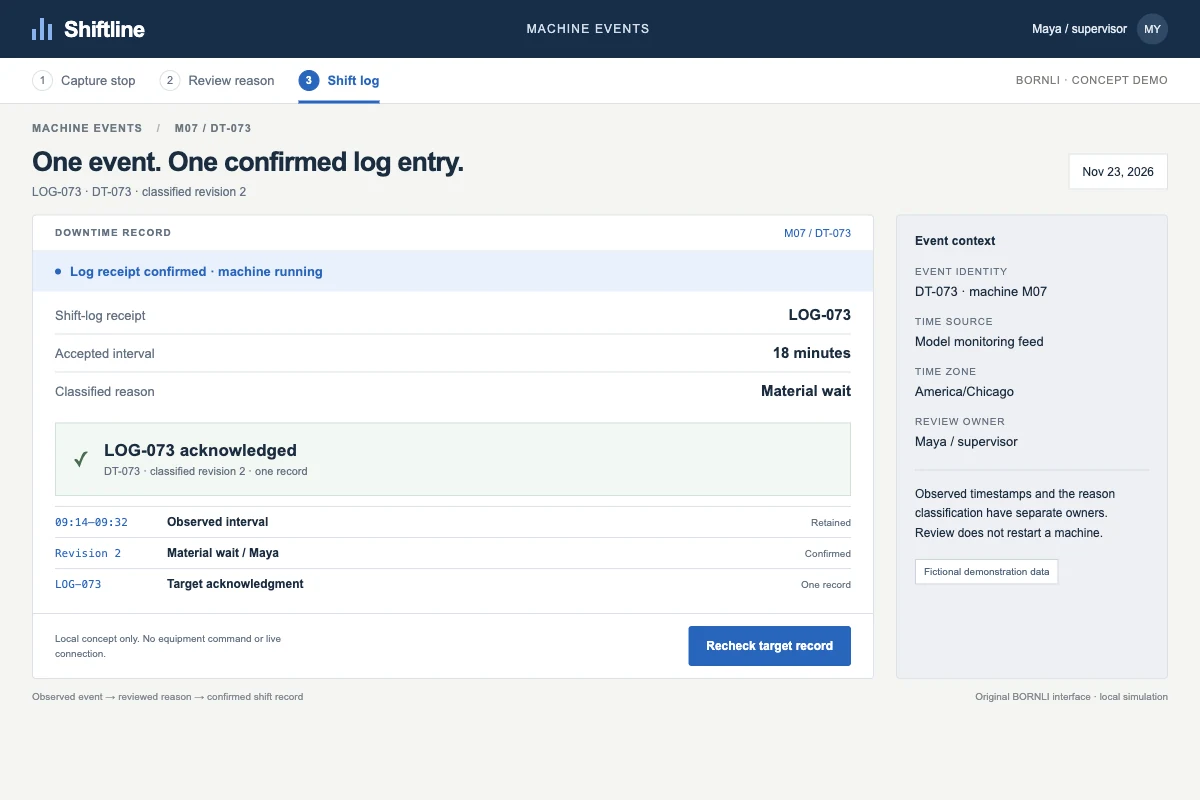
After classification, the app submits DT-073 to the shift log. Until the receiving system acknowledges the record, show Log confirmation pending. An accepted record can then display its target ID, version and confirmed status. In the model, the target record is LOG-073, with an 18-minute interval and the reviewed reason attached.
A response can be lost after the target has accepted a request. Recovery should look up the existing record using the same correlation identity before creating another one. A second tap should reconcile DT-073 with LOG-073, not add another 18 minutes to the report. The precise method depends on the monitoring and reporting systems available.
Late or overlapping machine events need a separate exception path. Retain the original event sequence, flag the affected interval and let an authorized person reconcile it. Recalculate dependent summaries only after that correction is accepted, with the previous version still traceable.
The resulting shift record should answer three different questions: What time interval was observed? Which reason was approved? Did the reporting system accept that version? A green status for one of those questions should not stand in for all three.
Pilot one workcell with difficult events included
Start with one machine group, one event source and one shift-log destination. Agree who owns machine IDs, the reporting time zone, reason codes, corrections and unresolved events. Decide whether existing monitoring tools can provide the required timestamps before quoting an integration.
Test a stop with no end event, an operator report entered late, an overlapping event, a revised reason, an offline save and a target that accepts a record but loses its response. The acceptance criterion is a traceable history and one acknowledged log entry for the accepted interval, including after a retry.
Measure missing timestamps, unclassified intervals, correction effort and unacknowledged records. Compare similar shifts and include supervisor review time. A faster form or a lower count of “unknown” reasons does not by itself prove less downtime; classifications may simply have changed.
Bring a sample shift sheet, an anonymized machine-event export and one difficult correction. Those show whether the first step should be configuration or a small custom workflow. Our build-versus-buy guide helps frame that choice. Scope, available interfaces and acceptance criteria determine the estimate.
Map the workflow before building it.
Tell us what your team handles manually, which tools you use, and where the process gets stuck. Start by email.
Discuss your workflow ↗