BORNLI / product decisions
A cycle counting app that keeps recounts separate from stock changes
A cycle counting app should capture what is physically in a bin, preserve how it was counted and route differences for review before changing stock. Start with one warehouse and a clear rule for movements during the count.
Start with the counting gap in your current warehouse system
A cycle counting mobile app helps a warehouse team record physical quantities, investigate differences and hand a reviewed adjustment to its stock system. The useful boundary is a count that can be explained later: which bin, which item, which unit, which attempt and who approved the change.
Check the existing WMS first. Microsoft documents mobile cycle counts, hidden expected quantities and review of differences in Dynamics 365 Warehouse management. Its documentation, updated October 9, 2026, also says open count work does not itself block inventory. This describes that product and its configuration, not a BORNLI integration or a rule shared by every warehouse system.
A custom interface is worth scoping when the remaining gap is concrete: carton conversions confuse counters, recount evidence gets lost, or staff cannot tell whether an approved adjustment reached the WMS. If an existing configuration solves the problem, use it. A second stock database would add another reconciliation task.
The following illustrative scenario is a BORNLI concept demo, not a customer implementation. One bin and one item move through three screens. Counts, people, times and record identifiers are fictional.
Capture the count without revealing the expected quantity
A counter opens task CC-318, scans bin A-04-02 and checks item SEAL-12. The screen shows the unit definition: one carton contains 12 individual pieces, recorded as EA. The counter enters three full cartons and seven loose pieces. The app calculates 43 EA and preserves both original inputs.
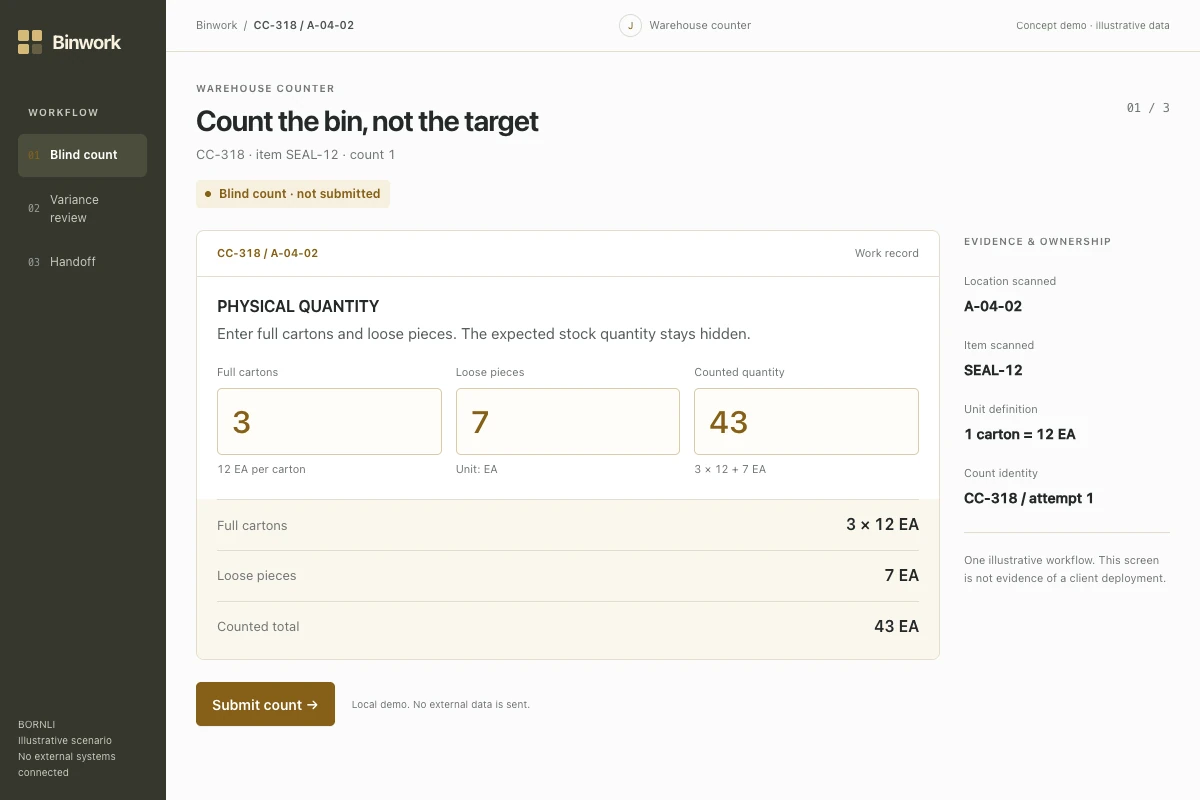
The expected stock quantity stays hidden from the counter. Showing a target beside the field would turn an independent observation into a request to confirm a number. The review screen can display the target later, to a different role.
Reject an item scanned into the wrong bin task. Require an explicit zero when the bin is empty; an untouched field is not a zero count. Keep a separate route for an unexpected item. Do not silently add it to the selected item's quantity.
If a carton label differs from the saved unit definition, stop the conversion and ask the inventory controller to resolve it. Preserve the observed label. An app that converts the wrong package size accurately still creates the wrong stock adjustment.
A matching recount is evidence, not permission to adjust stock
In the scenario, the WMS snapshot contains 48 EA. The first submitted count is 43 EA. A second counter repeats the physical count without seeing either the target or the previous result, and also records 43 EA. The controller now sees both attempts and the proposed difference of −5 EA.
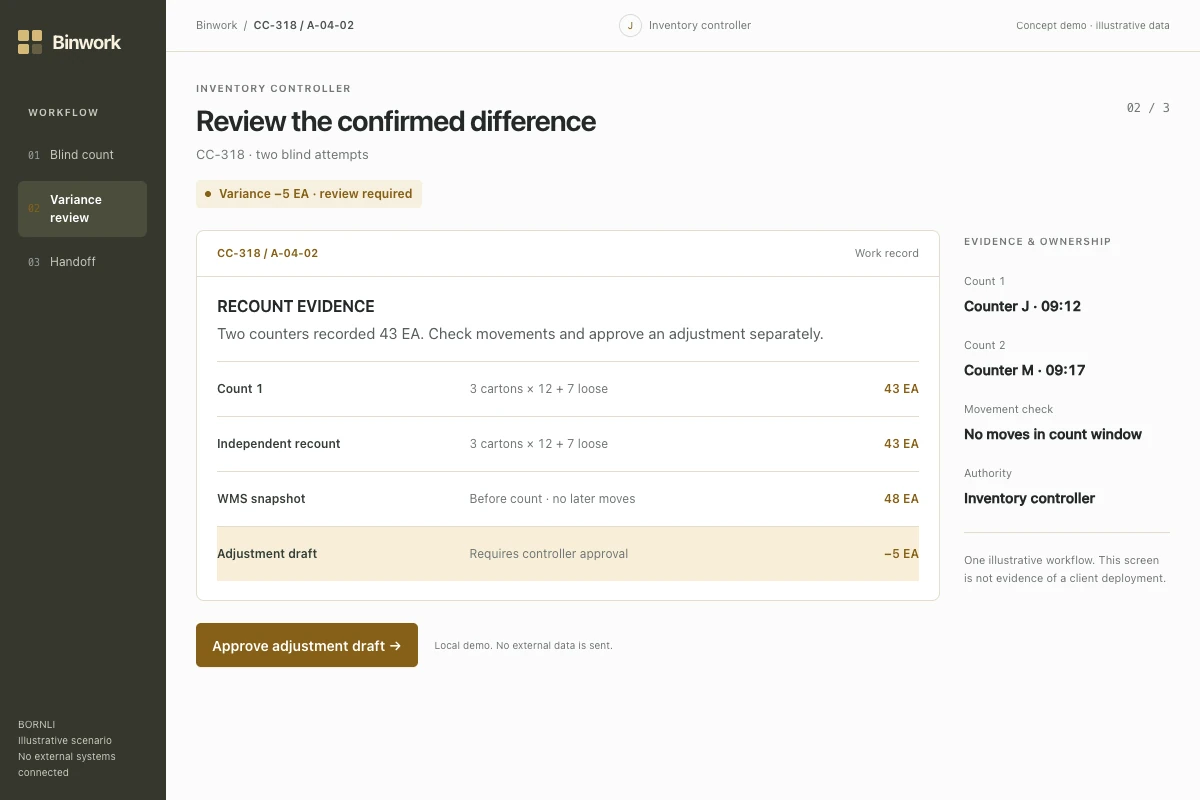
Before approving that difference, check what moved during the count window. Our example records no movements between the snapshot and the completed recount. If five pieces were picked after the snapshot, the same physical count would have another explanation. The app must not label every difference as missing stock.
Choose one operating rule for the pilot: either pause movements for the selected bin during a short counting window, or reconcile all movements against a defined cutoff. Document who can release the bin. Do not claim that opening a count automatically freezes inventory.
Keep the first attempt, recount, timestamps, unit conversion and review decision. Correcting a mistaken entry should create a recorded correction rather than overwrite the history. This is a different task from resolving a short pick during order fulfillment; a count can lead to an inventory change and needs its own authority.
Separate approval from the warehouse system's receipt
The controller approves adjustment draft ADJ-611 for −5 EA. It refers to CC-318 and the checked 48 EA snapshot, with an expected resulting quantity of 43 EA. Approval makes the draft eligible for handoff. It does not prove the WMS accepted it.
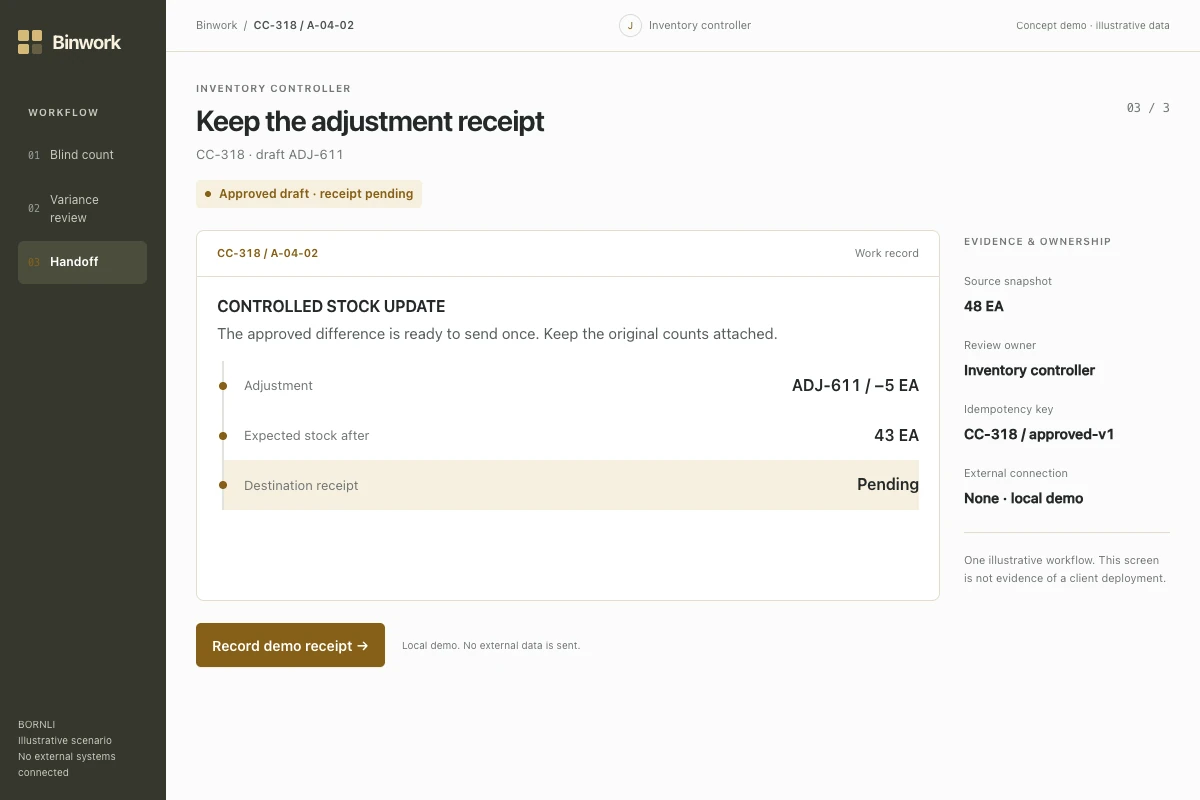
Before sending, compare the current stock version with the reviewed snapshot. A later movement or competing adjustment should reopen review. If the request times out, look up the same adjustment identity before retrying; do not create a fresh correction merely because the response was lost.
The local demo models receipt W-918 as acknowledgment of ADJ-611. A production integration would need to verify that meaning against the actual WMS: received, queued and posted may be separate statuses. The interface should display the status returned by that system and retain the original counts.
For an offline counter, local save and server receipt also need separate labels. The first pilot can require connectivity if reliable offline synchronization is outside its scope. That limit should be decided before field rollout.
Test one bin group before extending the app
Start with one warehouse, a small bin group and non-lot-tracked items with agreed unit definitions. Add serial numbers, lots, expiry dates and multiple stock owners only when their rules are explicit. Assign one role to count and another to approve adjustments.
- Unit test: three cartons of 12 plus seven pieces must remain 43 EA in the saved record, review and destination.
- Movement test: introduce a pick during the count window and verify that the app requests reconciliation instead of posting a blind difference.
- Repeat test: submit the same approved adjustment twice and confirm one destination record.
- Exception test: cover an empty bin, wrong item, changed carton size, lost connection and rejected adjustment.
Measure count-to-review elapsed time, recount frequency, unit-related corrections and rejected handoffs. Compare similar bin groups and include controller review time. These are proposed pilot measurements, not results achieved by this concept.
For a build-versus-buy decision, bring the current count sheet, unit list, movement rule and WMS adjustment process. BORNLI can scope the interface and integration boundary around those artifacts; the next step does not require a complete technical specification.
Map the workflow before building it.
Tell us what your team handles manually, which tools you use, and where the process gets stuck. Start by email.
Discuss your workflow ↗