BORNLI / product decisions
AI warranty claim review with traceable evidence
AI can assemble a warranty claim for review: read the purchase record, link the serial label and expose missing or contradictory evidence. The useful first step is a complete, traceable case; coverage and remedy decisions stay with your authorized team.
Give the warranty team a reviewable evidence packet
AI warranty claim review fits a manufacturer whose staff repeatedly switch between purchase records, product-label photos and customer descriptions. A useful first release assembles those sources, extracts candidate fields and flags gaps. Your authorized team still decides coverage and the appropriate remedy.
There is a concrete public example. AgilePoint describes Apex Tool Group’s warranty workflow: order details, images and claim reasons appear in a consolidated review workspace, with image analysis and ERP handoff. This is a vendor-reported customer story, not an independent audit or a BORNLI project. We checked it on November 23, 2026; the page does not state a publication date or a measurement period and sample for its reported improvements. We do not use its headline reductions as a benchmark or promise.
The workflow below is an original BORNLI concept demo with fictional claim data. Its scope is narrower: prepare evidence and create an internal case after human review. It does not automatically approve or reject warranty coverage, diagnose a defect from a photo, authorize a replacement or issue a refund.
Keep the purchase record, product label and customer account together
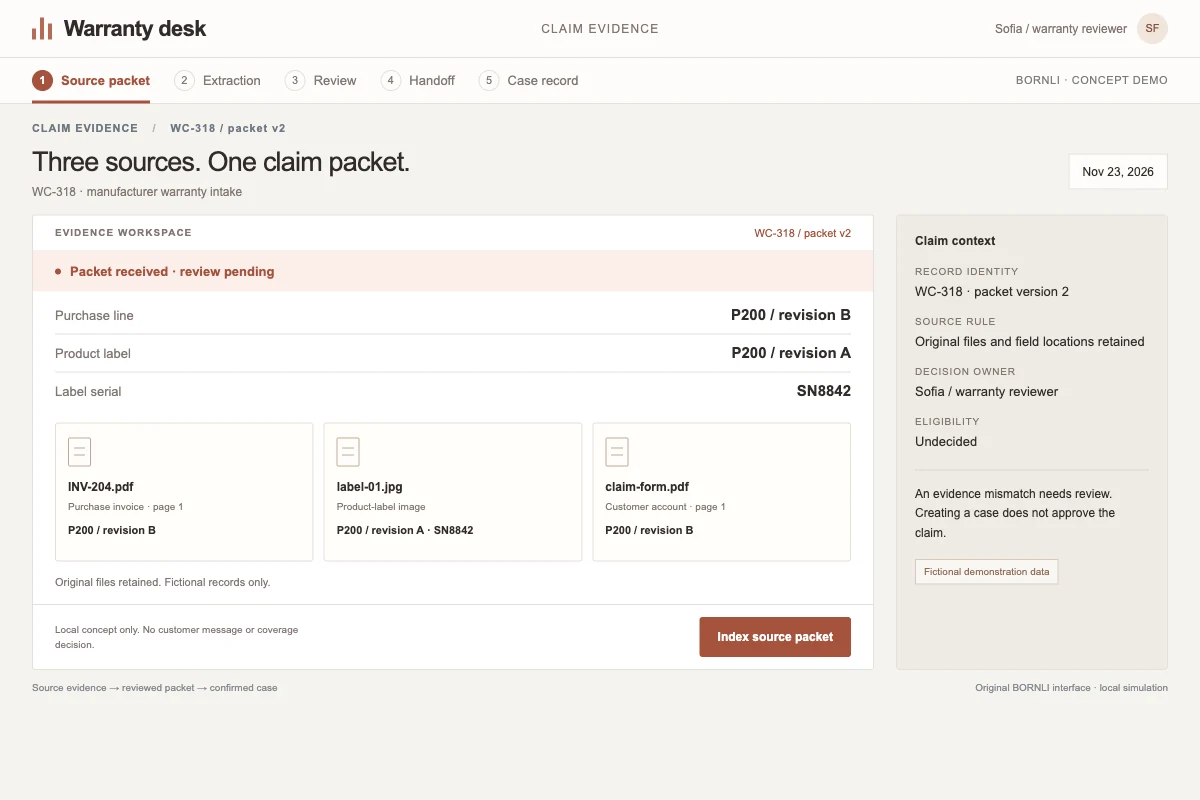
Claim WC-318 arrives as packet version 2: invoice INV-204, a product-label image and a customer form. The invoice line says P200 revision B; the label image says P200 revision A and serial SN8842. The form repeats revision B. Those are conflicting inputs, not permission to choose the value that appears twice.
Retain each original file, its version and its relationship to the claim. Give the reviewer an immediate list of what is present, unreadable or missing. An upload named “receipt” is not evidence that the purchase record is complete or belongs to that product. A product photo may help identify the item while still being insufficient to establish the cause of a reported failure.
For the pilot, accept only the agreed document types through an authorized intake route. Keep access limited to the people handling the claim, and agree retention with the business before importing historical packets. The demo uses fictional records throughout.
Extract candidate fields and make contradictions easy to inspect
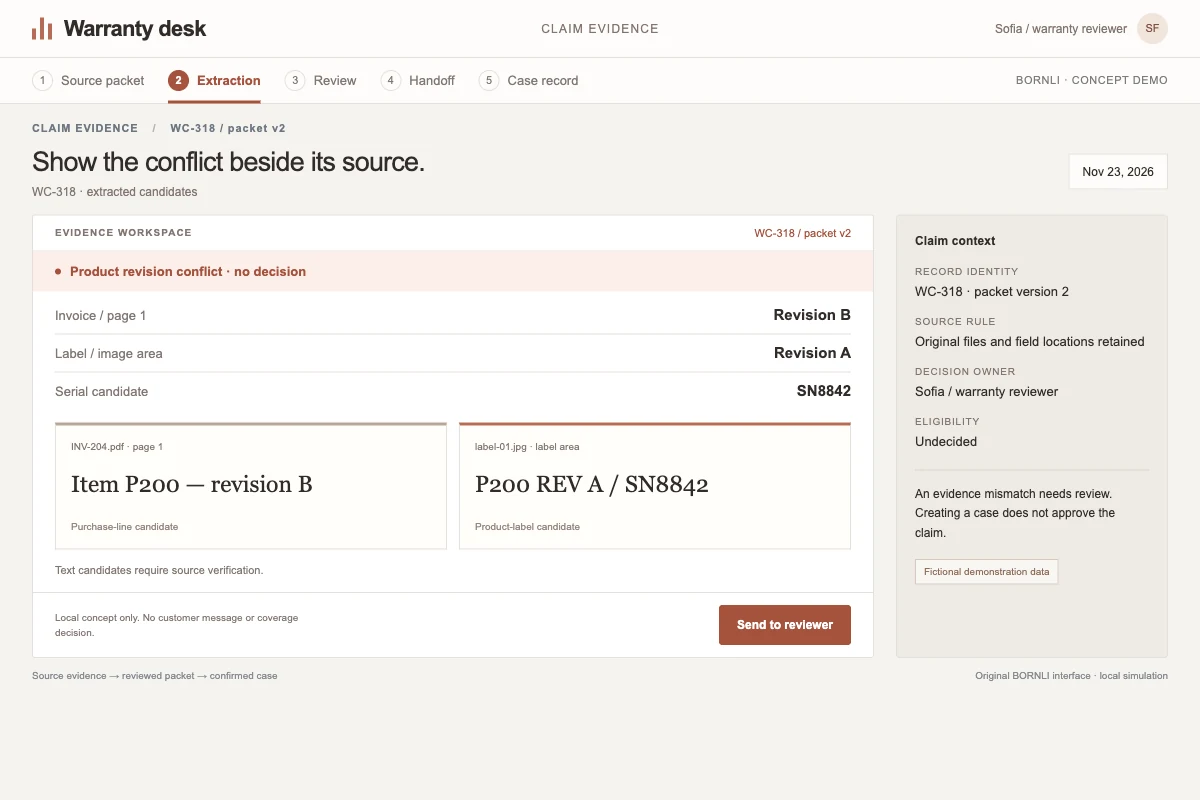
A plausible implementation uses document storage, an extraction service, a review database and the existing claim system. Microsoft Document Intelligence’s layout model can extract text and tables with source structure. For a PDF-and-JPEG pilot, retain the page or image area behind each candidate so the reviewer can check the original.
In WC-318, the useful output is a short evidence comparison: invoice revision B, label revision A, serial SN8842 and the source of each field. The system should flag Product revision conflict. It should not turn that conflict into an accusation of fraud, a defect diagnosis or a coverage decision.
Use deterministic checks where the rule is explicit: required files, expected serial format and exact matches against the authorized product catalog. Use AI for reading varied documents or preparing a concise summary, with uncertain fields left unresolved. A confidence score cannot replace the source image or prove that a purchase record is authentic.
Let the reviewer decide what evidence is needed next
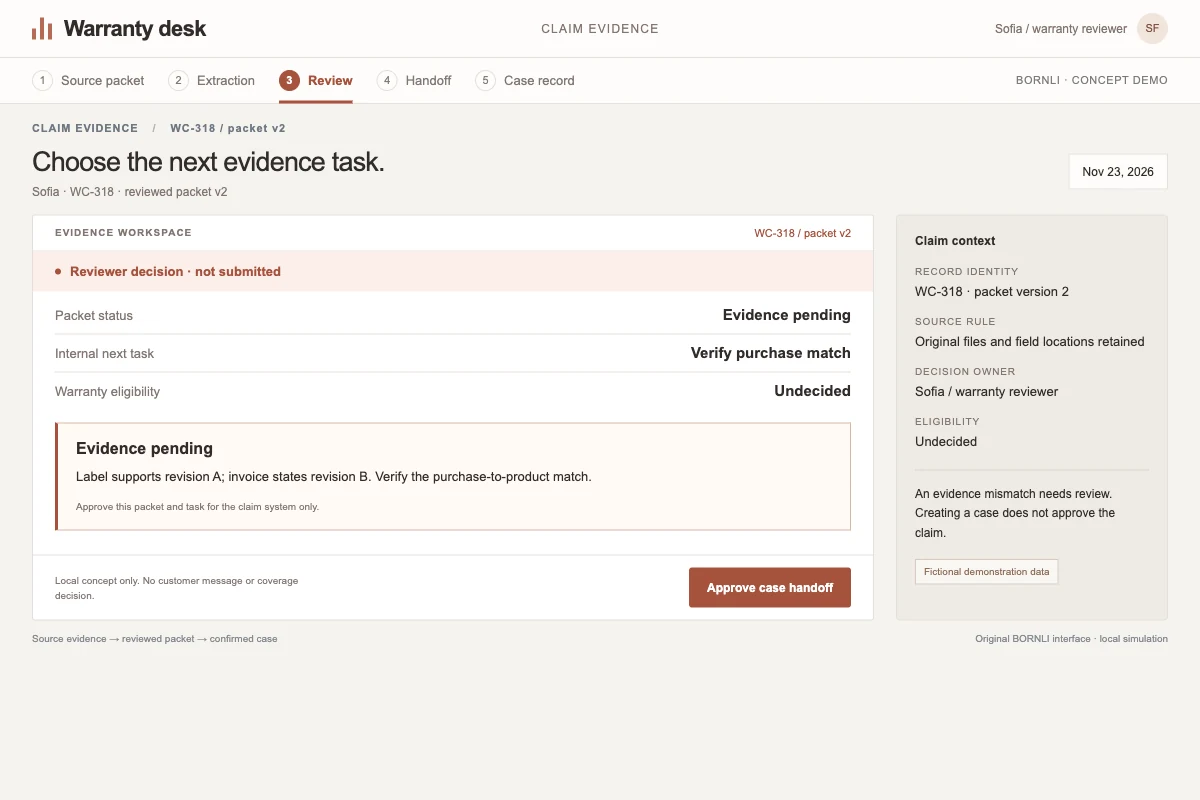
Sofia reviews the model packet. The label supports revision A, but the purchase line points to revision B. She records Evidence pending and assigns an internal task to verify the purchase-to-product match. The case remains undecided; an incomplete match is not an automatic rejection.
The screen should preserve both candidates and Sofia’s note. Her approval here means “this packet and next task are ready for the claim system,” not “this customer is entitled to a remedy.” Keep those permissions and labels distinct.
When new evidence arrives, create a new packet version and reopen the relevant review. Do not silently attach a replacement file to an already approved packet or carry an old decision forward after its evidence changed. No message to the claimant is sent by this illustrative review action.
Create one internal case and verify the receiving system’s answer
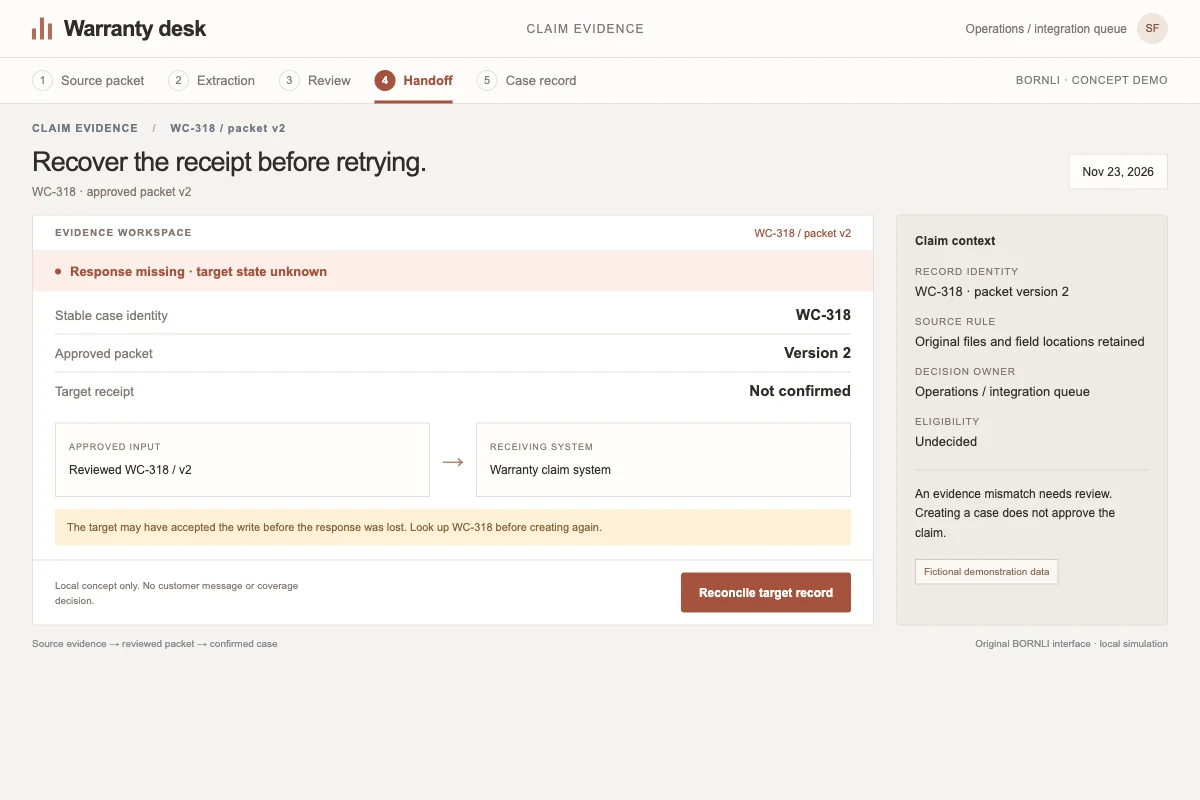
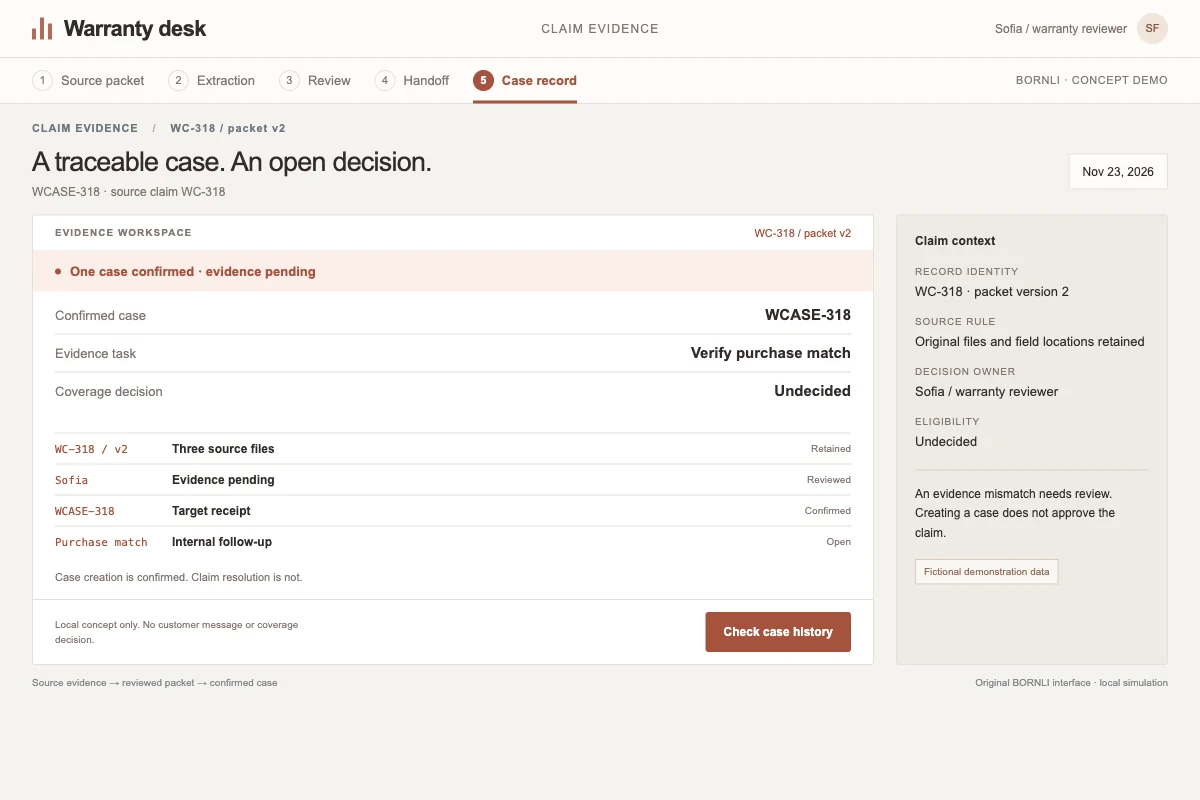
The reviewed WC-318 packet version 2 is ready for handoff, with Sofia as reviewer and the purchase-match task still open. The app sends only the agreed fields and permission-controlled evidence links to the claim system. It waits for a confirmed target record before displaying success.
In a Dataverse implementation, alternate keys can reference records when they are defined for the relevant table. That is one possible part of the design, not a guarantee of exactly-once delivery. Confirm the actual schema, permitted operations and duplicate behavior before choosing the integration.
Use a stable claim identity for the case and track packet version separately. If the response disappears after the target accepts the case, reconcile by that identity before submitting another creation request. A later packet should update the existing case through an explicit reviewed revision, rather than create a new case merely because its version changed.
A rejected write stays in an exception queue with an owner. A local “sent” event is not proof that the case exists. In the demo, recovery finds receipt WCASE-318 for the original request; it does not create a second case or approve coverage.
The useful result is one traceable case with an honest status
The completed model handoff contains one case, WCASE-318, linked to WC-318 and reviewed packet version 2. Its status is Evidence pending, with the purchase-to-product match assigned to an internal owner. Warranty eligibility remains undecided.
That record demonstrates a narrower result than “the claim was resolved.” It does not establish that a customer received a reply, that a defect was confirmed, that a replacement was approved or that money was saved. The benefit to test is whether reviewers can reach the next justified action with less searching and fewer missing sources.
Keep the source comparison, review note, target receipt and later revisions together. This lets the next person understand why the case is waiting without opening a new, disconnected investigation.
Measure evidence quality and review effort before expanding
Bound the pilot to one product family, one intake route and one claim-system connection. Agree required evidence, product-reference data, reviewer roles and the fields that automation may write. Start by configuring existing warranty software if it already covers this flow; a separate AI layer should solve an identified gap.
Use representative historical packets plus difficult examples withheld from tuning: a blurred serial label, a mismatched revision, two products on one invoice, a duplicate submission, a replaced attachment and a target response lost after acceptance. Check each field against a human-reviewed reference. Include examples where “unresolved” is the correct result.
Measure extraction errors by field, unsupported product matches, missing source links, reviewer corrections, review time and duplicate or unacknowledged target records. Include the cost of resolving exceptions. Compare similar claim types before and after; changing case mix can change the numbers without an automation effect.
An anonymized packet, a current review checklist and your claim system’s integration details are enough to start scoping. Our AI workflow pilot guide explains acceptance criteria, while the automation maintenance guide covers ownership after launch. We define cost and timeline after reviewing the actual scope; no external case result becomes a promise for your business.
Map the workflow before building it.
Tell us what your team handles manually, which tools you use, and where the process gets stuck. Start by email.
Discuss your workflow ↗