BORNLI / product decisions
AI contract renewal tracking that keeps dates tied to their source
AI can prepare a renewal register from supplier agreements, but a date in a PDF is not automatically the date your team should act on. Link each extracted field to its source, review amendments and let an authorized owner confirm internal reminders before they reach a calendar.
Extract the evidence before scheduling the reminder
AI contract renewal tracking fits procurement teams that repeatedly open signed supplier agreements, find dates and copy them into a register. A useful workflow prepares source-linked fields and exposes missing documents. An authorized person still confirms what applies and when the team should review it.
There is a relevant public example. Docusign reports that Sensata Technologies is piloting custom extractions in Agreement Manager, including renewal dates surfaced by its Iris AI engine. The story describes a pilot, not a completed renewal-tracking rollout. As checked on November 22, 2026, it provides no publication date, pilot measurement period, extraction-accuracy figure or quantified renewal savings. This is vendor-reported experience, not an independent audit or a BORNLI project.
Docusign separately describes AI-extracted agreement fields, renewal dashboards and notifications. Those capabilities establish a practical product category; they do not establish that a model can safely choose every date without review. If an existing contract platform covers the workflow, configure it before commissioning a separate tool.
The workflow below is an original BORNLI illustrative scenario. All agreement names, dates and IDs are fictional. It demonstrates document handling and internal reminders, not legal advice, a renewal decision or automatic cancellation.
Bring the agreement and its amendments into the same record
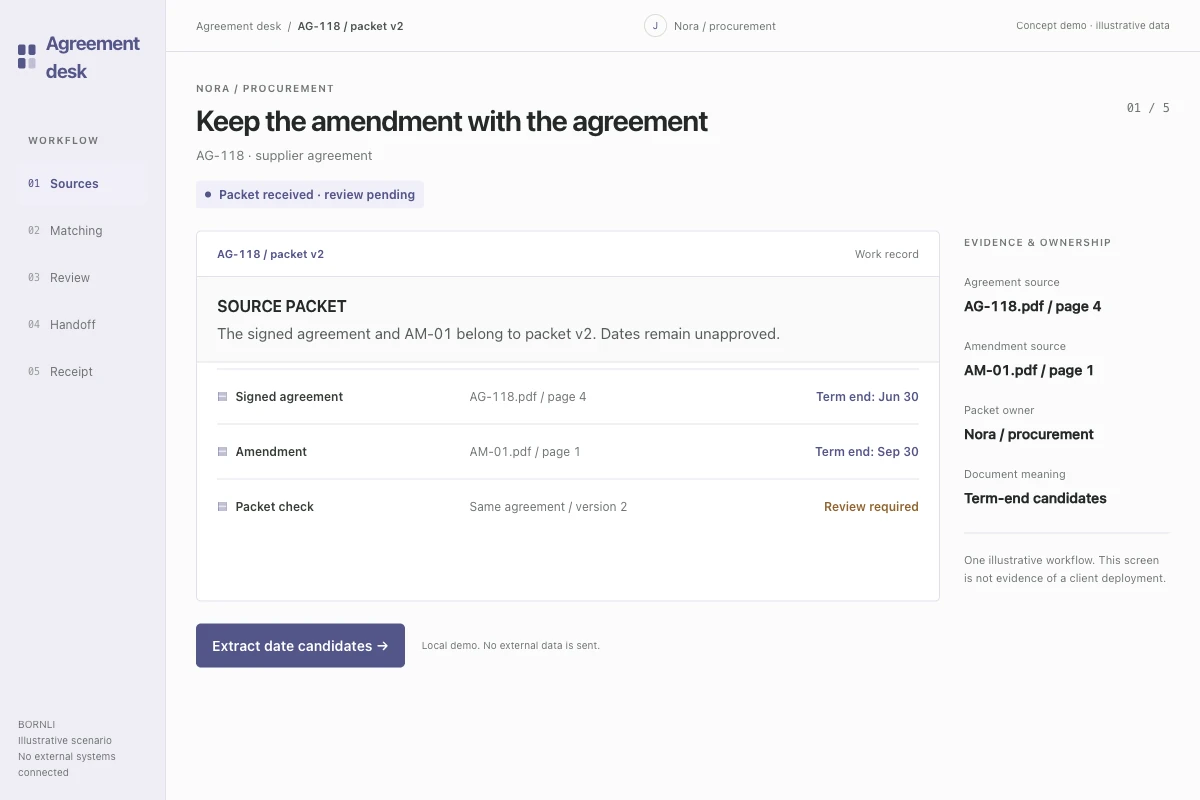
The example procurement desk receives supplier agreement AG-118 and amendment AM-01. The original document states a June 30, 2027 term end. The amendment contains a September 30, 2027 term-end field. Both belong to packet version 2; neither should disappear when the other is uploaded.
Save immutable copies, document identities, versions and page references. Link the packet to the existing supplier record and its responsible owner. Do not infer that two documents belong together just because their filenames look alike. An unsigned copy, missing schedule or uncertain relationship should leave the packet incomplete.
For a first pilot, choose one document repository and one supplier-agreement family. Keep access limited to the documents each reviewer is permitted to see. Do not copy entire agreements into public alerts or broadly shared calendars.
Show what each date means and where it came from
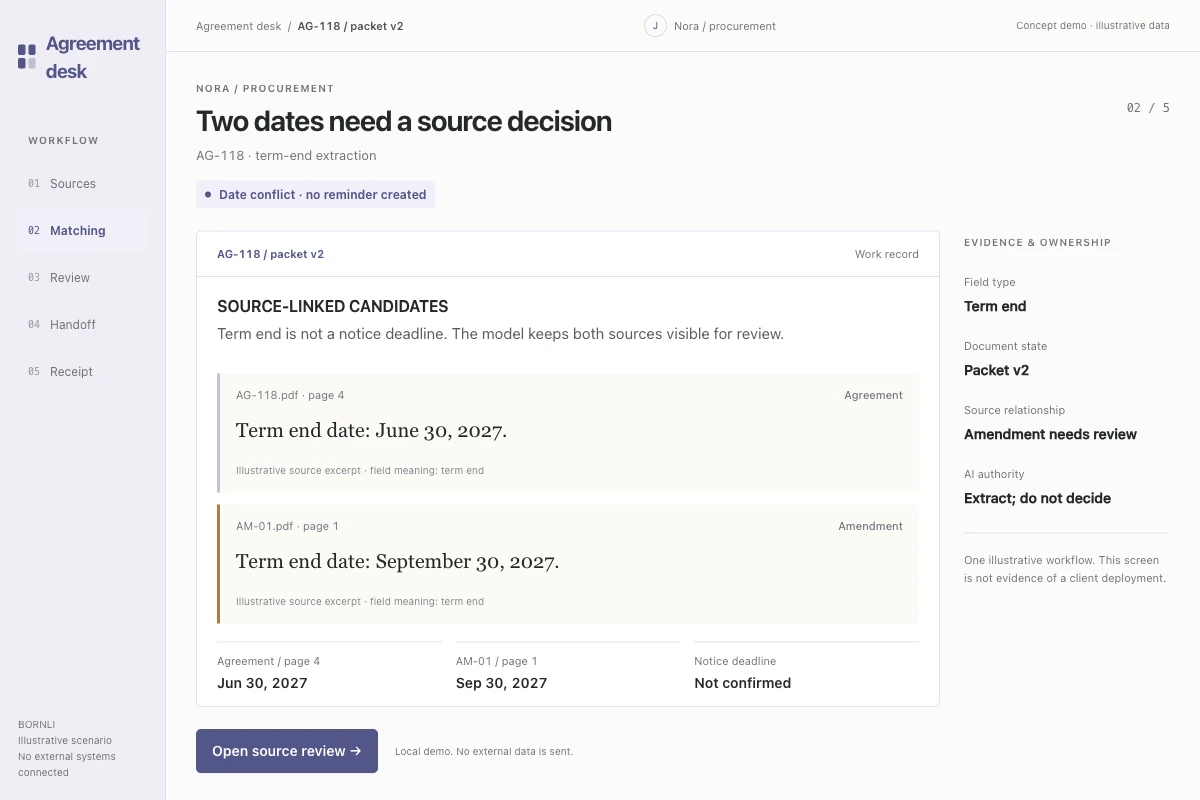
The extraction stage produces a candidate field, not an instruction to act. In this example it returns Term end: June 30, 2027 — agreement, page 4 and Term end: September 30, 2027 — amendment, page 1. The conflicting candidates are visible together.
Keep term end, renewal date, notice deadline and the team’s internal review date as separate fields. If a notice deadline is absent or ambiguous, leave it unresolved. Do not invent one by subtracting a plausible number of days or relabel a term-end date as a cancellation deadline.
The proposed stack is a document repository, text extraction where needed, an AI service returning structured fields with source references, a versioned review database and an internal reminder connector. Deterministic checks validate date formats, packet identity and required evidence. The AI service does not decide legal effect, resolve conflicting clauses or create calendar entries.
Let the owner confirm the source and choose the internal review date
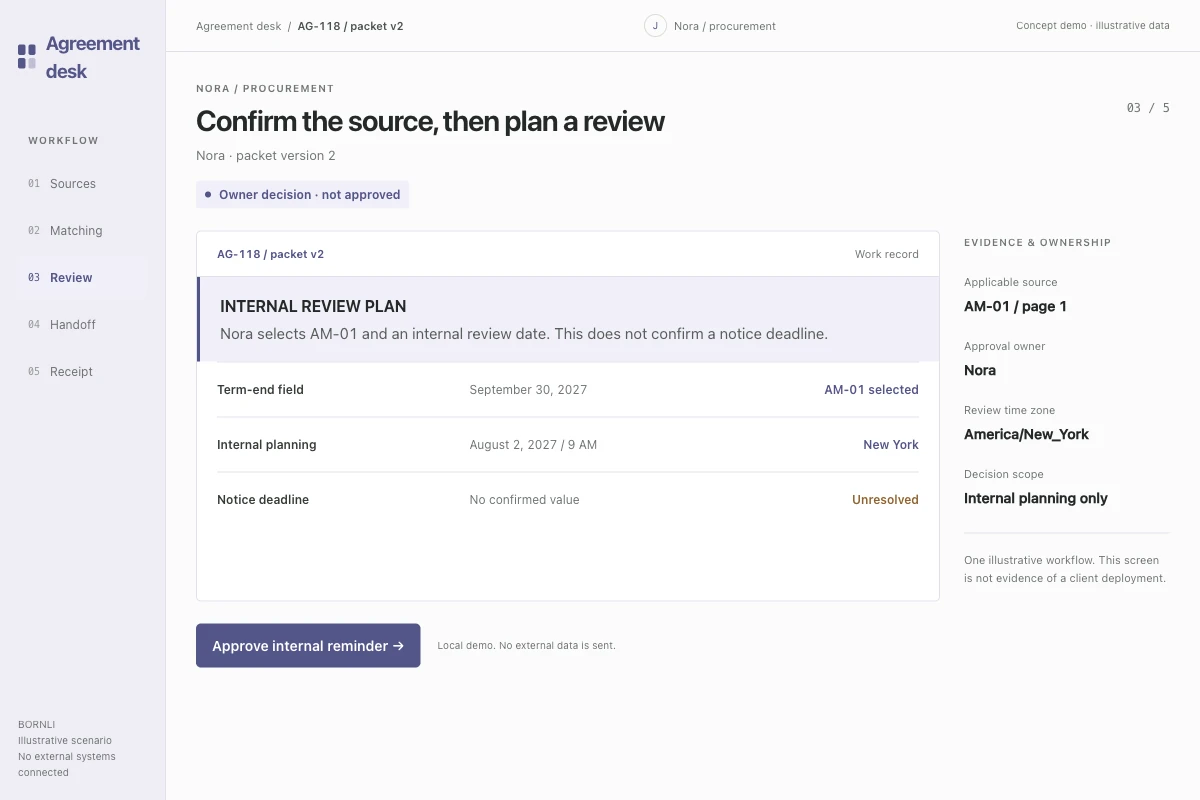
In the concept, procurement owner Nora checks the signed packet and confirms AM-01 as the applicable source for the tracked term-end field. She records September 30, 2027 and a reason for selecting the amendment. Questions about interpretation or conflicting obligations go to the organization’s authorized reviewer; the model does not settle them.
Nora separately chooses August 2, 2027 at 9:00 a.m. in America/New_York for an internal review task. That is a fictional planning choice, not a calculated contractual notice deadline. The record still says Notice deadline: not confirmed. Approving this internal task does not approve renewal or cancellation.
Bind the approval to packet version 2 and the exact field values. A later amendment, changed reminder date or reassigned owner should reopen the affected review. Keep who accepted the field, when, from which page and why; a confidence score is not a substitute for that decision.
Confirm the calendar receipt before saying the reminder exists
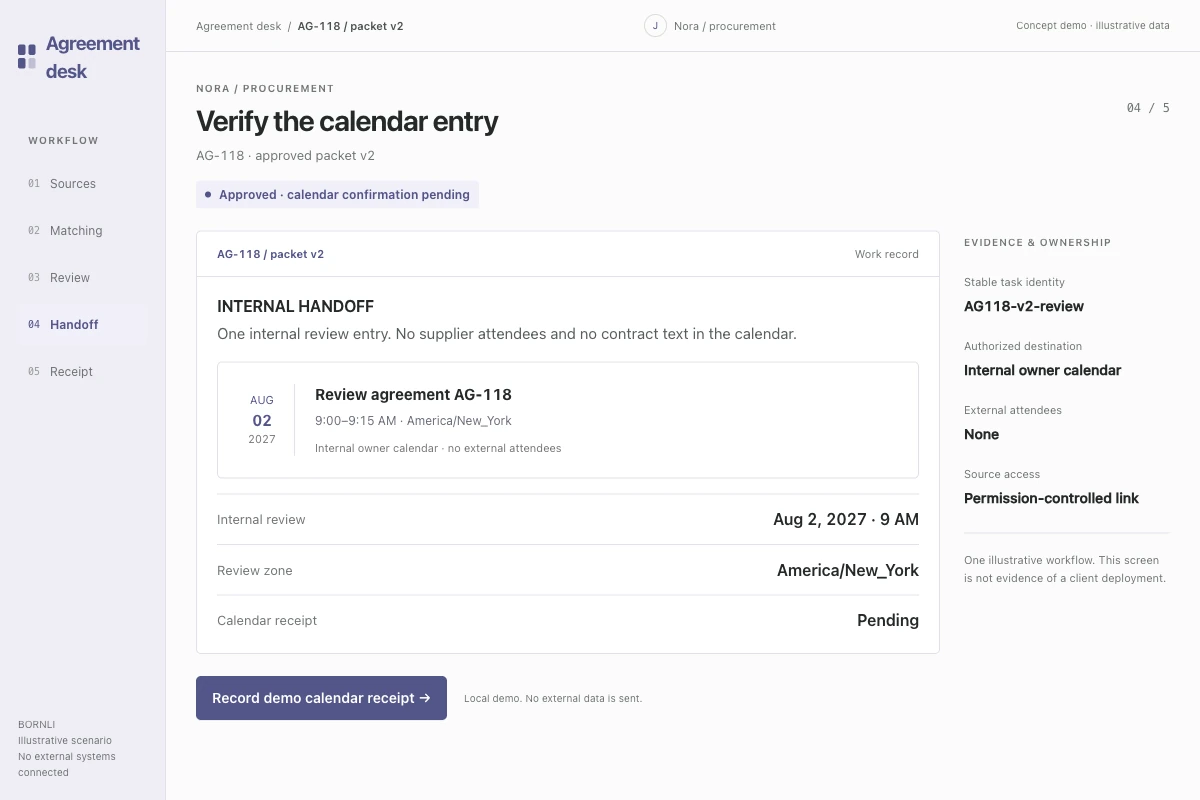
The approved record creates one internal calendar entry for the review task. It contains an agreement ID and a permission-controlled link, not sensitive contract text. It has no supplier or external attendees. The owner’s access and calendar permission must be checked before the integration is enabled.
Microsoft Graph’s event documentation supports explicit time zones, an optional transaction identifier and a returned event object on success. It also states that including attendees sends invitations. That is why the proposed pilot uses an authorized internal calendar and excludes external attendees; the connector must map and validate the time zone supported by the actual mailbox.
Use a stable identity derived from the agreement, approved packet version and reminder type. If the request times out, reconcile that identity and the target record before creating anything else. Do not retry with a new identity each time or claim exactly-once behavior from an API option alone.
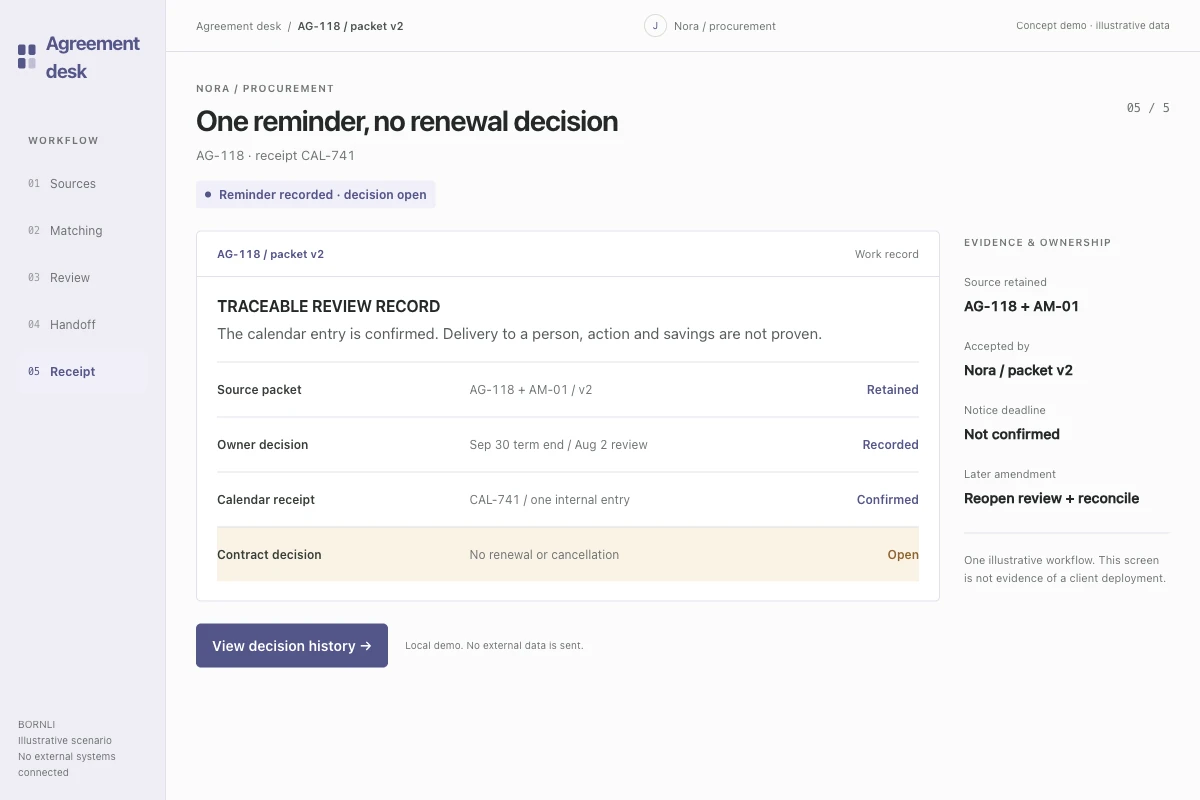
Until the target receipt is verified, show Reminder approved — calendar confirmation pending. In the model, the confirmed receipt is CAL-741. A retry should return to that same entry. A subsequent amendment must reopen review and flag the existing reminder for reconciliation, rather than silently leaving two conflicting tasks active.
The result is one traceable review task, not a renewal outcome
The completed model record contains the source packet, Nora’s accepted term-end field, an internal review date and calendar receipt CAL-741. It can truthfully say that one internal reminder was recorded. It cannot say that anyone received or acted on the reminder, that the agreement was renewed or that money was saved.
The useful change is the connection between source, decision and task. When an owner opens the reminder, they can find the approved packet and see what remains unresolved. In this example the notice deadline is still unconfirmed and the renewal decision is still open.
Judge the pilot by missed evidence and review effort
Start with one supplier-agreement family, a small approved document set and one internal calendar. Exclude autonomous notices, cancellation, legal interpretation and payments. Keep ambiguous documents in a manual queue. Agree who resolves them and what happens if that owner is unavailable.
Prepare an evaluation set with amendments, scans, missing pages, several dates on one page and agreements that contain no explicit renewal date. Have the responsible team establish the expected fields and source pages. Measure field accuracy by type, missing source references, amendment-selection errors, reviewer corrections and end-to-end review time. Test rejected calendar writes, time-zone handling and repeated requests separately.
Count reminders with verified target records and unresolved handoffs. Any savings calculation must include document preparation, review, exception handling and maintenance. The public Sensata story does not provide a numerical benchmark for this workflow, and the concept has no measured client results.
Use our AI workflow pilot guide to define acceptance criteria and automation maintenance guide to assign ownership after launch. To scope this process, bring a redacted agreement, an amendment example, the current renewal spreadsheet and the intended internal destination. We agree the pilot boundary, cost and timeline after reviewing those inputs.
Map the workflow before building it.
Tell us what your team handles manually, which tools you use, and where the process gets stuck. Start by email.
Discuss your workflow ↗