BORNLI / product decisions
AI order processing that keeps the purchase order in view
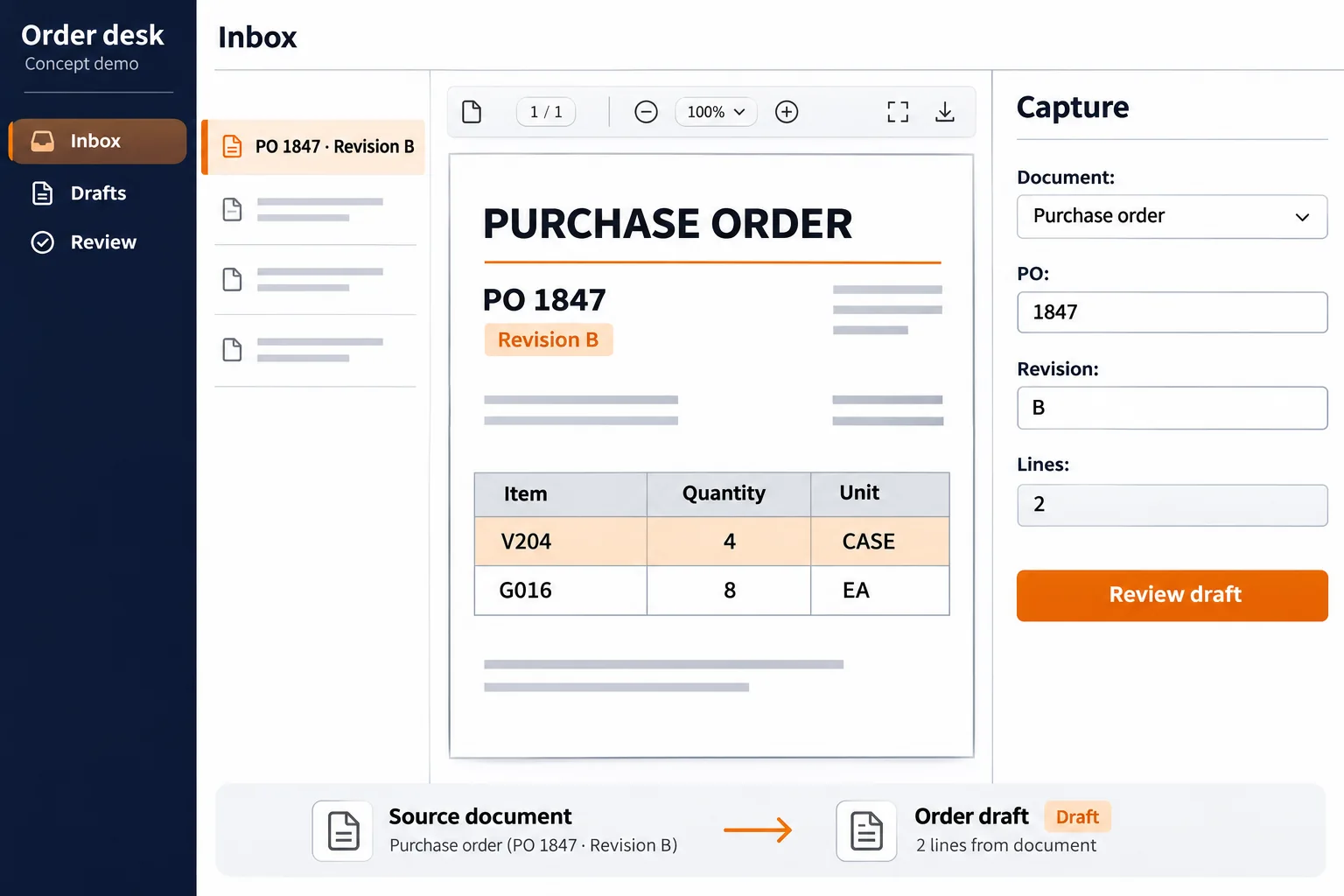
An AI order-processing pilot can turn an emailed PDF into a reviewable sales-order draft. Start with one order desk and keep the original document beside the extracted fields, so a coordinator can approve the customer, items and quantities before submission.
Before building
Check what your order system already handles.
Start with the documents your order desk retypes: customer purchase orders arriving as email attachments. If the buyer already supplies a reliable structured export, use that feed where possible. An AI extraction pilot is more useful for varied PDFs that a coordinator currently reads line by line.
Some order systems already provide a document import. Oracle’s 26A Order Management documentation, for example, describes converting uploaded purchase-order PDFs into sales orders. It lists required document fields and configuration steps. Ask your provider to demonstrate your actual document types before commissioning a separate tool. A custom workflow can then address a specific gap, such as matching a buyer’s case quantities to your catalog units.
This article starts after a buyer has sent an order. For messages that still need classification or a quote owner, see the separate inquiry-routing workflow.
Illustrative scenario · order desk
Four cases can be read correctly and still become the wrong order.
Our fictional buyer sends PO 1847, revision B. Line one says V204, quantity 4, unit CASE. Line two says G016, quantity 8, unit EA. These are made-up item codes and quantities. The interface concepts show only the fields discussed here; a production order would also need the customer, addresses and other fields required by the receiving system.
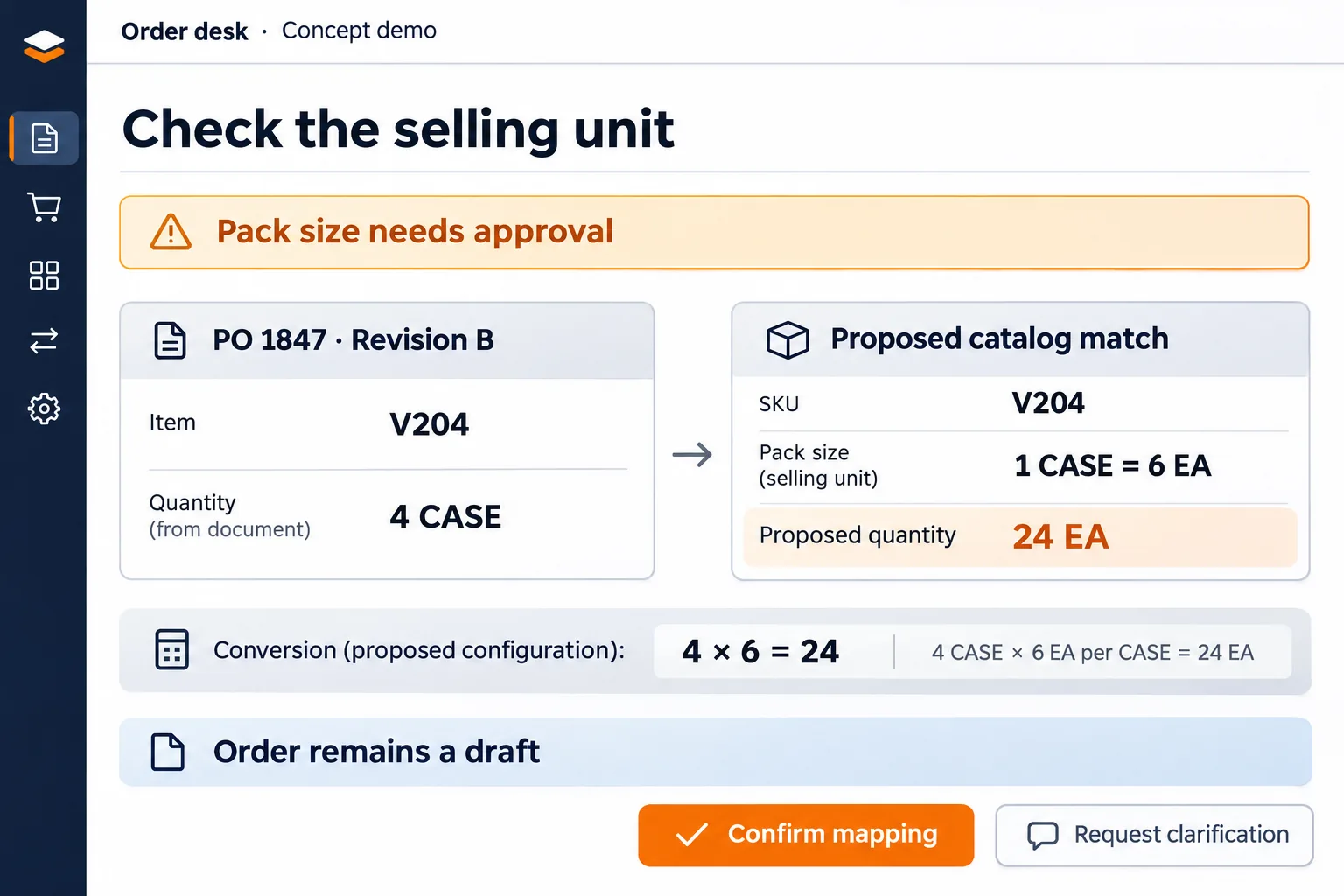
Keep the original quantity and unit beside the proposed catalog match. In this scenario, a proposed pack size is six units per case, making four cases equal to 24 individual units. That arithmetic is simple. Establishing that the buyer and seller mean the same case is the part a coordinator must approve. An old pack size, a customer-specific item code or a missing unit should hold the draft for clarification.
Retain the source page and line for each extracted value. When a coordinator changes a field, keep both the extracted value and the approved value with the reason. This lets another person see whether an error came from reading the PDF or from matching it to the catalog.
Review boundary
Separate reading, matching and permission to submit.
Reading identifies text in the document. Matching selects your customer, ship-to location, item and selling unit. Approval authorizes the resulting order draft for the next step. A pilot should make each of these decisions visible, even if the eventual workflow combines some of them.
Microsoft’s Document Intelligence guidance describes confidence estimates and notes that some fields do not return a score. A reading-confidence score is not a check against your catalog or a customer’s purchasing terms. For the first pilot, have a coordinator review every draft and record the corrections. Use those examples to decide which checks could later be automated.
Agree on stop conditions with the order desk: unmatched item, unresolved unit, missing required address, changed price or a new revision of an existing PO. A blank required field should remain visible as missing. The workflow should not invent an address or silently choose a similar product to complete the form. Sending a customer confirmation and releasing a warehouse task should each have an explicit boundary beyond extracting the document.
Revisions and retries
The same PO number does not always mean the same document.
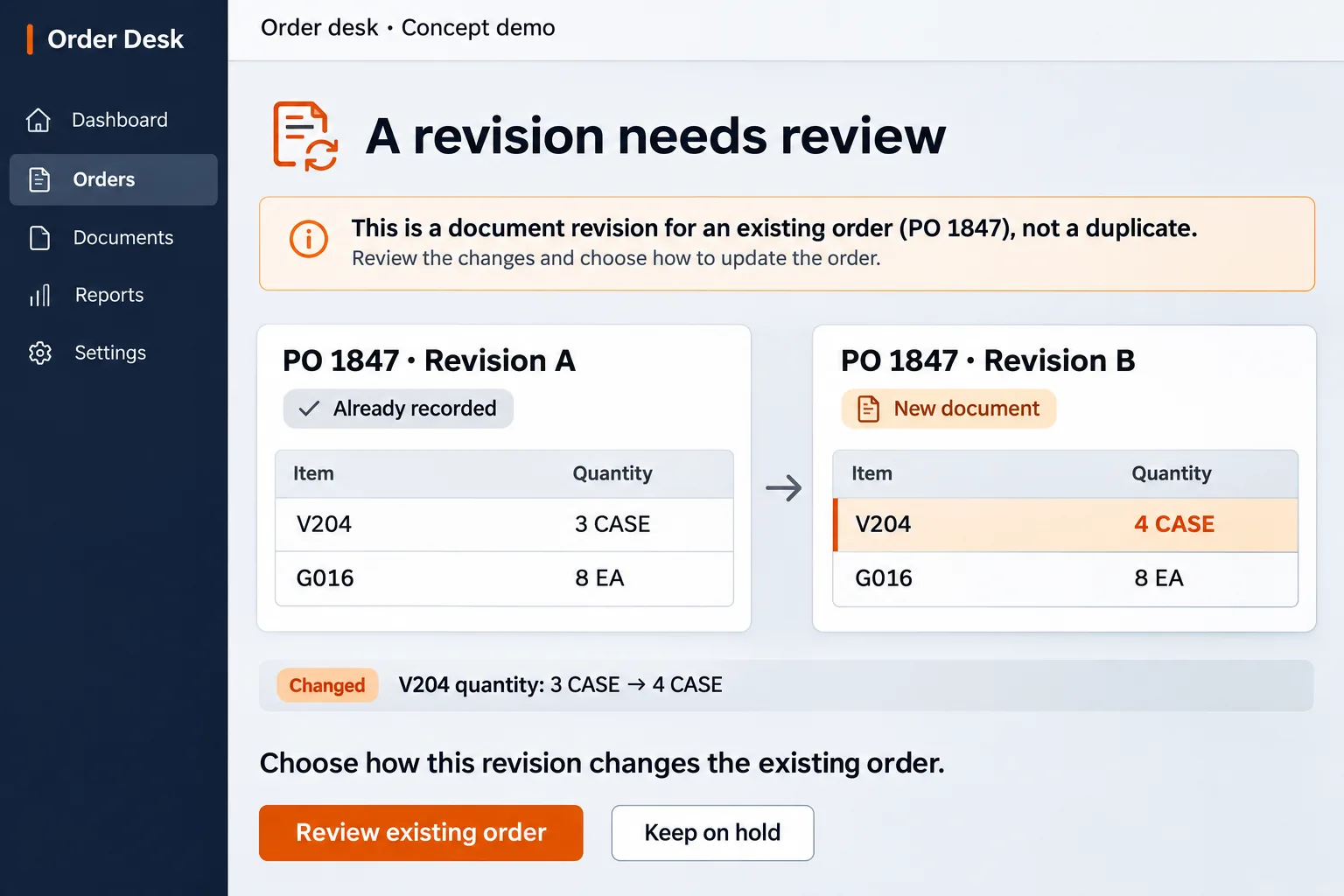
Suppose revision A of PO 1847 already exists in the order system with three cases of V204. Revision B changes that quantity to four cases. Link the new document to the existing order and ask a coordinator to review the change. The original document and the accepted revision should remain available. Once fulfillment has started, a quantity change may need a different approval path.
Receiving the identical attachment again is a different situation. Keep a file fingerprint and source-message reference so an exact repeat can point to the existing intake record. Match the buyer as well as the PO number: unrelated customers may use the same number. A changed file should enter revision review rather than being discarded solely because its number matches.
Also test a timeout after the receiving system saves the order. Before retrying a write, the integration must be able to identify the previous operation’s result. If that cannot be determined safely, hold the item for reconciliation. The order desk needs a visible queue with an owner and a last action, including items that failed before producing a draft.
A decision-ready pilot
Measure a usable order, including the corrections.
Choose one intake channel and one receiving system. Assemble anonymized examples that include different PDF layouts, multiple pages, an unclear scan, missing units, an exact resend and a genuine revision. Have a coordinator record the expected result before running the extraction. Keep some examples aside until the workflow is ready to be tested.
- All lines survive. Compare the source with the draft, including rows continued on another page. Record missing, extra and incorrectly combined lines.
- The order means the same thing. Check customer, ship-to, item, quantity and unit together. Count drafts that need no correction separately from fields read correctly.
- Uncertainty reaches a person. Every unresolved required field has a reason and an owner. No held document disappears from the intake total.
- A resend creates no extra order. Replay the same file, then send a revised version. The first resolves to an existing intake record; the second reaches revision review.
- The comparison includes review time. Measure reading, correction, clarification and recovery work against the same team’s manual baseline. Set acceptance limits before choosing whether to roll out.
To scope the work, prepare representative redacted documents, a sample catalog with selling units, required order fields and the destination system’s integration documentation. Request a workflow estimate from BORNLI. Describe which step takes time today; agree on the pilot’s output and approval boundary before extending it to live order submission.
Map the workflow before building it.
Tell us what your team handles manually, which tools you use, and where the process gets stuck. Start by email.
Discuss your workflow ↗