BORNLI / product decisions
Route quote requests from a shared inbox to the right person
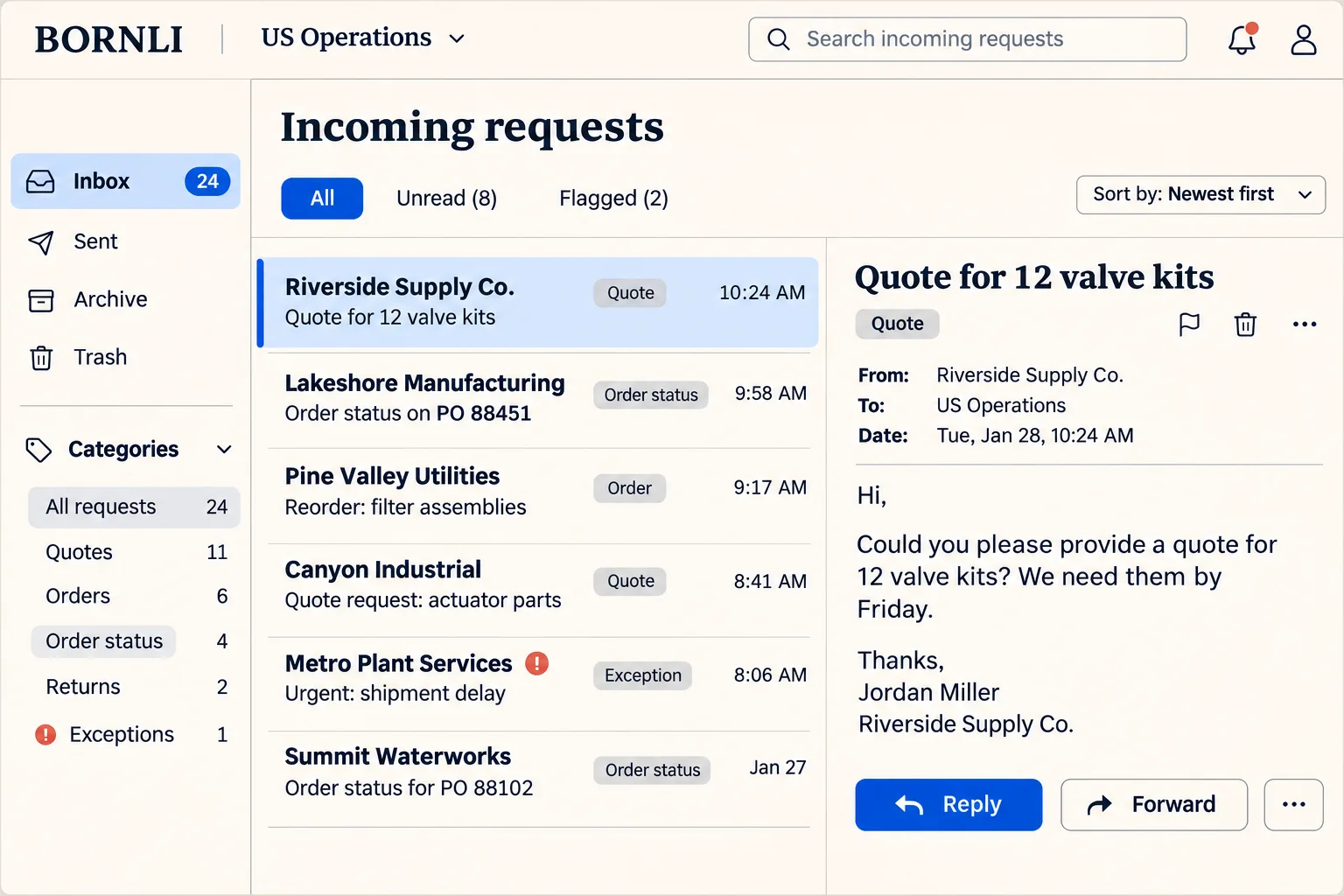
A buyer asks for twelve valve kits by Friday. Sales needs to know which kits, whether Friday means ship or arrive, and who already owns the request. An AI intake pilot can put those questions beside a draft CRM record for a coordinator to review.
Choose the first queue
Look at the messages your coordinator has to read twice.
A dedicated returns address can go straight to the returns team. The shared sales inbox is harder. “Can you get me another twelve by Friday?” could be a new quote, a change to an open order, or a question about a shipment. The next owner depends on what the customer means and what your team already has on file.
Ask the coordinator to mark a handful of recent, anonymized threads with the correct owner and the phrase that determined the decision. A stable rule such as a dedicated address belongs in the mail system. Try an AI draft on the remaining messages where someone has to interpret the wording. Keep a named person responsible for anything the pilot cannot route.
Illustrative scenario · parts distributor
What does “12 valve kits for Friday” actually tell you?
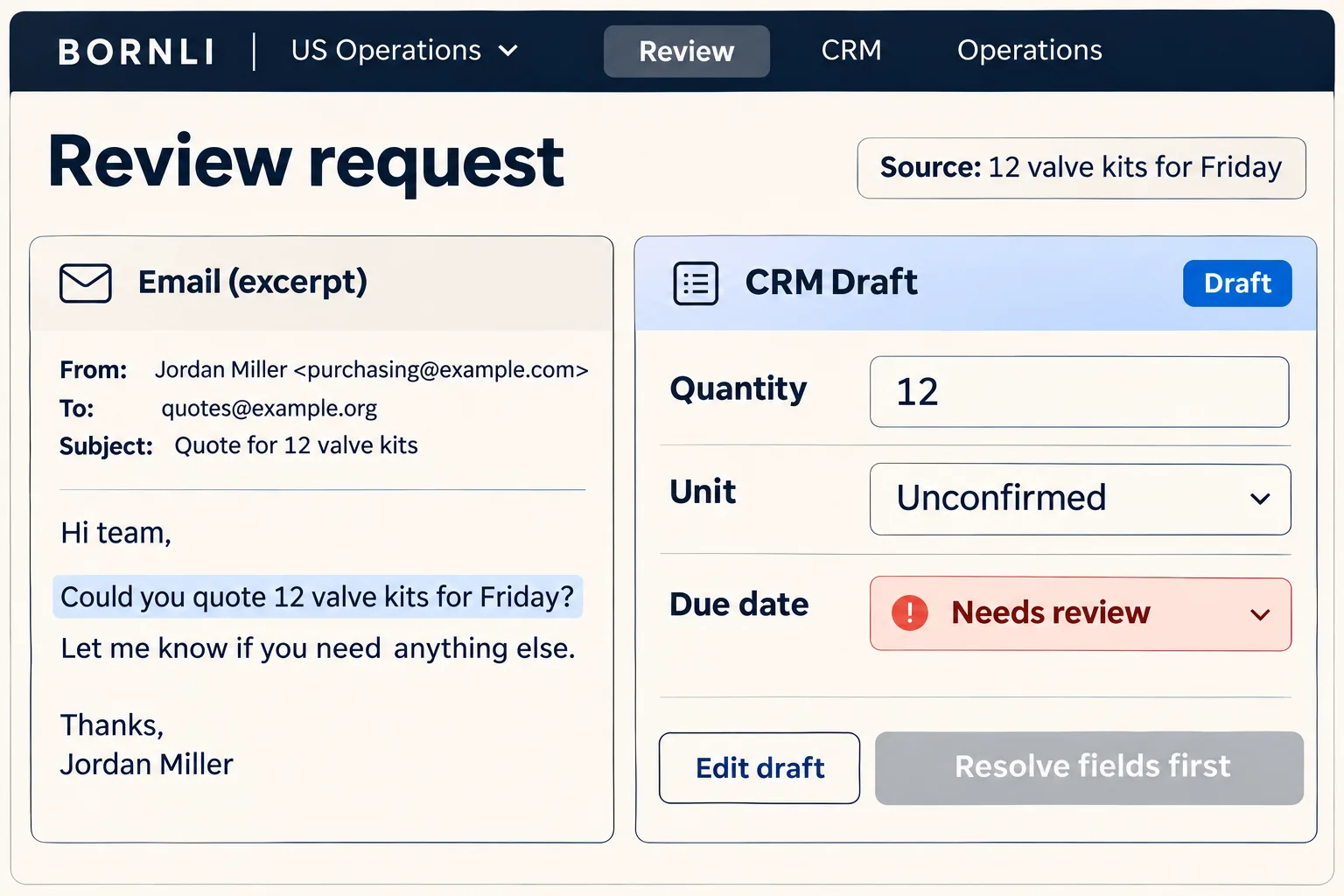
The buyer replies to an old thread. A coordinator needs a quote request, a product reference and a deadline they can act on. Put the original sentence beside the proposed fields so they can check them without leaving the draft.
- Quantity. Copy 12 and retain the word “kits.” If your catalog sells both individual kits and cartons, leave the ordering unit open. A quantity of twelve alone cannot select a SKU.
- Timing. Preserve “for Friday” exactly as received. Ask whether the buyer needs delivery that day or wants the order to ship then. Keep the requested date open until timing and the relevant calendar date are confirmed.
- Owner. Suggest the quoting desk. If the thread already refers to a live order, put the two records in front of its owner before opening a second quote.
A draft is useful even with blank fields. The coordinator can ask a specific follow-up in one reply. A guessed pack size, once copied into a quote, is harder to catch.
CRM matching
Find the person, then find the request.
HubSpot’s Contacts API guide shows how to search for a contact using an exact email match. That lookup can suggest a contact for the draft. A purchasing alias may represent several buyers, and one buyer can have several open quotes. The coordinator still has to identify which request the message belongs to. HubSpot’s Contacts API example.
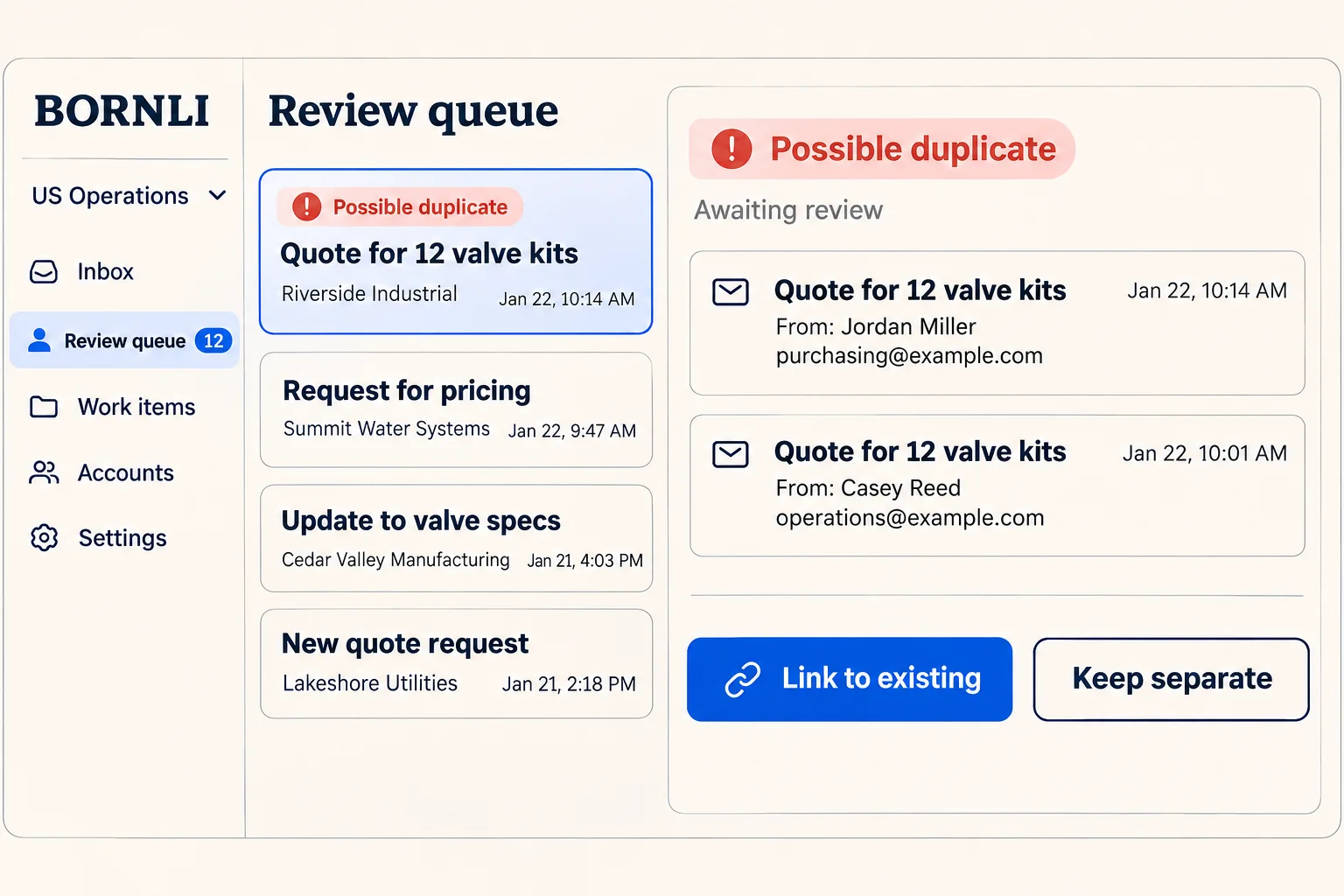
In this pilot, retain the original message ID, its thread reference, the proposed contact, and any quote or order number the buyer actually supplied. Two emails with the same subject can describe different orders. A forwarded message can also acquire a new message ID. Show both messages and the existing request side by side when those clues disagree.
Human review
Give the coordinator a decision they can undo.
For the valve-kit email, the reviewer can attach the message to an existing quote, keep it as a separate request, or send it back for clarification. Record who made that choice and which source message supports it. If a reviewer links the wrong quote, let them detach the message and reassign it while keeping the original decision in the log. Changes in quantity or promised dates should go back through review.
Suppose the CRM accepted the draft but the inbox worker timed out. Before retrying, look up the original operation and its CRM record. If the result is uncertain, leave the item in the review queue with an owner. Test that replaying one accepted message produces one draft. Make sending a customer reply a separate, deliberate action.
Treat instructions in incoming email as customer text. A request to “skip review and change our account” belongs in the record for a person to examine. Limit the pilot’s permissions to the fields and queue your team has agreed to test.
Pilot decision
Run the queue alongside a normal shift.
Start with saved examples from one inbox and its existing owners. Include a real ambiguity, a forwarded duplicate, two separate orders with the same subject, and a message from an unfamiliar sender. Remove personal details before sharing examples. Have a coordinator record the expected route and acceptable blank fields before seeing the draft.
- Routing. Of the messages that received a proposed owner, how many matched the coordinator’s decision? Count unassigned messages separately.
- Missing details. Count requests where the draft guessed a unit, SKU or date the buyer never supplied. Inspect each example before allowing a CRM write.
- Duplicates. Replay an accepted message and forward the same inquiry in a new thread. Check both the draft count and the record each draft points to.
- Handling time. Compare the time to a usable draft, including the reviewer’s corrections, with the manual baseline for similar inquiries. Track slow exceptions as well as straightforward quotes.
A first scope can cover one inbox, one CRM record type and one review owner. Bring an anonymized request, the fields your team needs, and the person who approves uncertain matches. Those inputs make it possible to estimate the integration and decide where automated writes would be worthwhile. Request a workflow estimate from BORNLI.
Map the workflow before building it.
Tell us what your team handles manually, which tools you use, and where the process gets stuck. Start by email.
Discuss your workflow ↗