BORNLI / product decisions
AI invoice exception handling before ERP posting
Turn mismatched supplier bills into clear, owned exceptions. Preserve the source, approve the next action and confirm the handoff before posting.
AI / accounts payable
Find the exception, preserve the evidence, ask for the right decision.
AI invoice exception handling can extract supplier-bill details, compare them with purchasing records and prepare a review task when something disagrees. A sensible first project stops before automatic ERP posting: the AP reviewer sees the source, checks the discrepancy and approves a specific next action.
This is for controllers and accounts payable teams that repeatedly chase missing receipts or reconcile document fields. It is a supplier-invoice workflow, distinct from entering a customer's order. The useful output is an explainable exception with an owner, not a complete-looking invoice assembled from guesses.
Illustrative scenario: we built Ledger room as a BORNLI concept demo with five local interface states. Northline Supply, its invoice, staff, quantities and timings are synthetic. There is no live ERP connector, payment action or measured customer result.
External evidence: Imperial Dade's AP process
Rossum's Imperial Dade case study reports that the North American distributor moved from a 7–10-day invoice process to a one-day turnaround. The implementation covered multiple systems: the page describes 31 subsidiaries going live in four months and headquarters in six months.
These are vendor-reported results for Imperial Dade, not independently audited findings or BORNLI results. The page, checked November 7, 2026, does not specify a dated measurement window. The rollout durations are not that window. This broad implementation does not establish the savings or timeline of our narrower proposed exception-review pilot.
Check existing matching rules before commissioning AI.
Your current ERP may already compare invoices, purchase orders and receiving records. For example, Oracle documents a NetSuite three-way vendor-bill approval workflow that routes discrepancies for review. It requires the relevant Approvals Workflow SuiteApp. The same page explicitly lists a limitation for partially received item receipts.
That detail matters here because the concept uses a partial receipt. It is not a screenshot of that NetSuite workflow or a claim that it supports this scenario. Check your actual product, configuration, receipt model and permissions. Build a custom review layer only if a specific intake, comparison or handoff gap remains.
100 billed, 80 received: keep the difference visible.
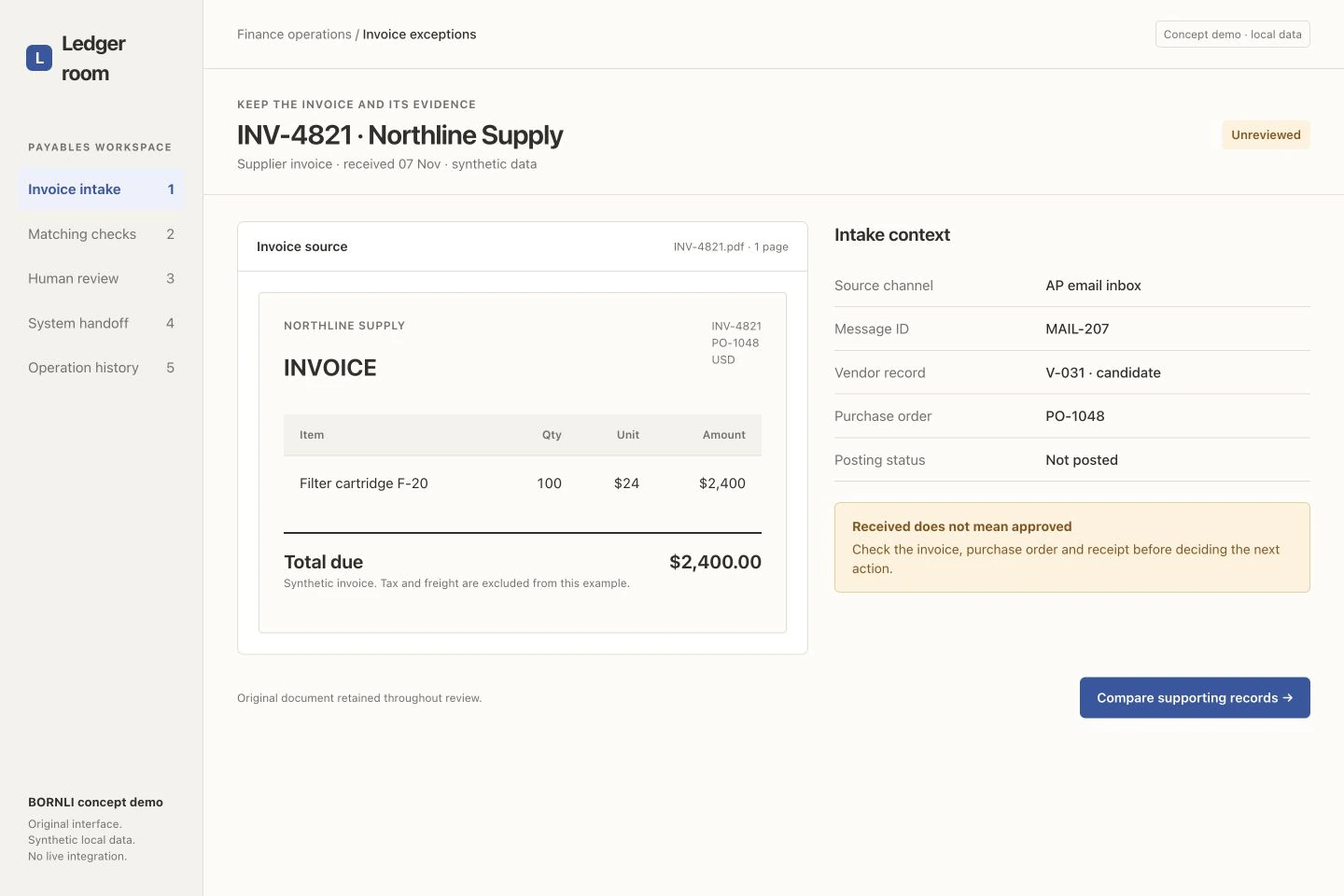
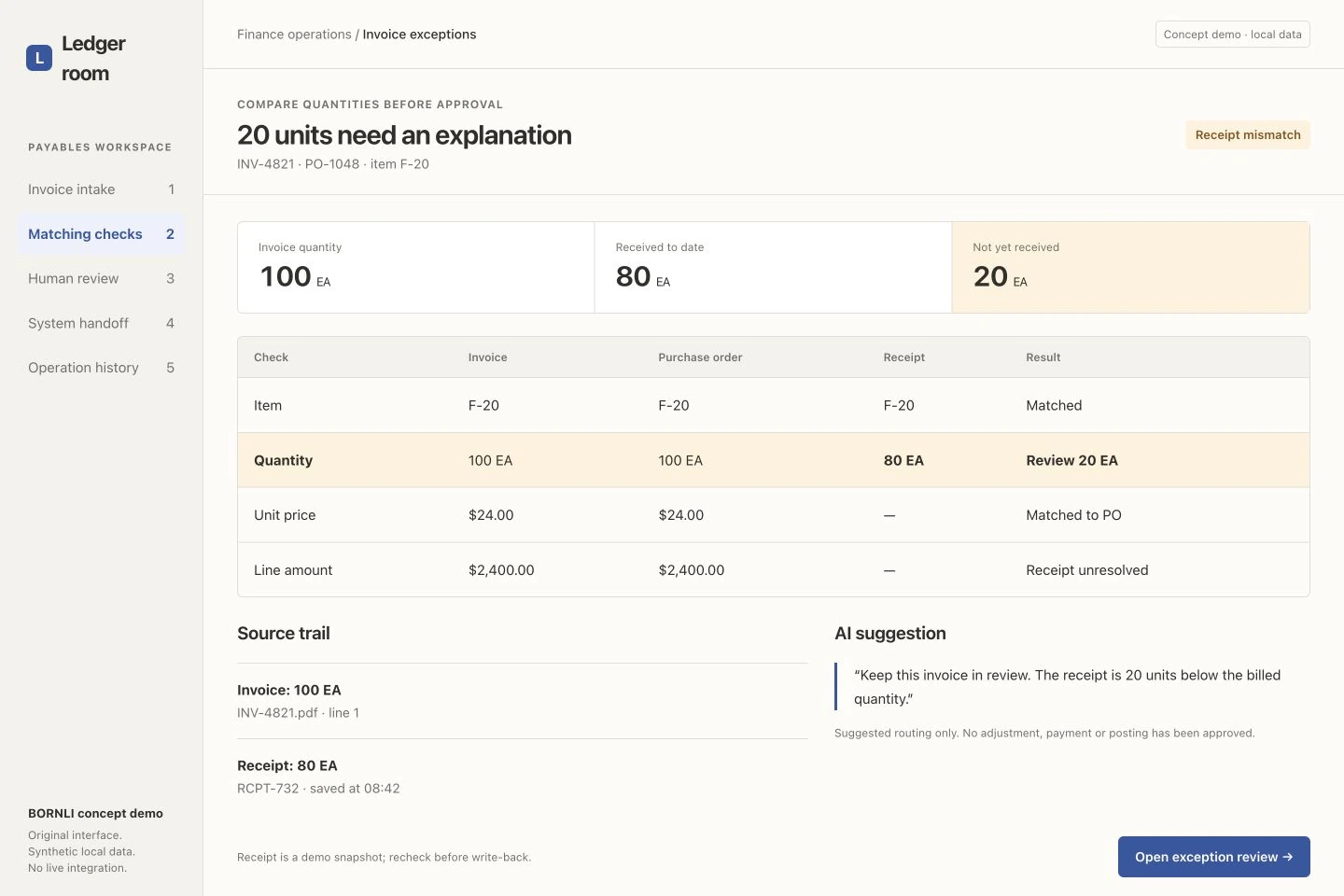
Synthetic invoice INV-4821 bills 100 filter cartridges at $24 each, for $2,400. Purchase order PO-1048 also calls for 100. Receipt RCPT-732 currently records 80. The unresolved difference is 20 units. Tax and freight are excluded from this example.
The AI suggestion is to keep the invoice in review and request a receipt check. It does not invent a delivery, reduce the bill to $1,920 or declare that the supplier is wrong. A partial receipt, stale record or extraction mistake needs a different resolution; the controller's policy and source records determine which applies.
Retain the original document beside extracted fields. Keep units, quantities, prices and record timestamps separate. Show which source produced each value, and recheck the latest receipt before acting on an older snapshot. A matching total alone is insufficient evidence that the goods were received.
Approve the next action, not an entire financial transaction.
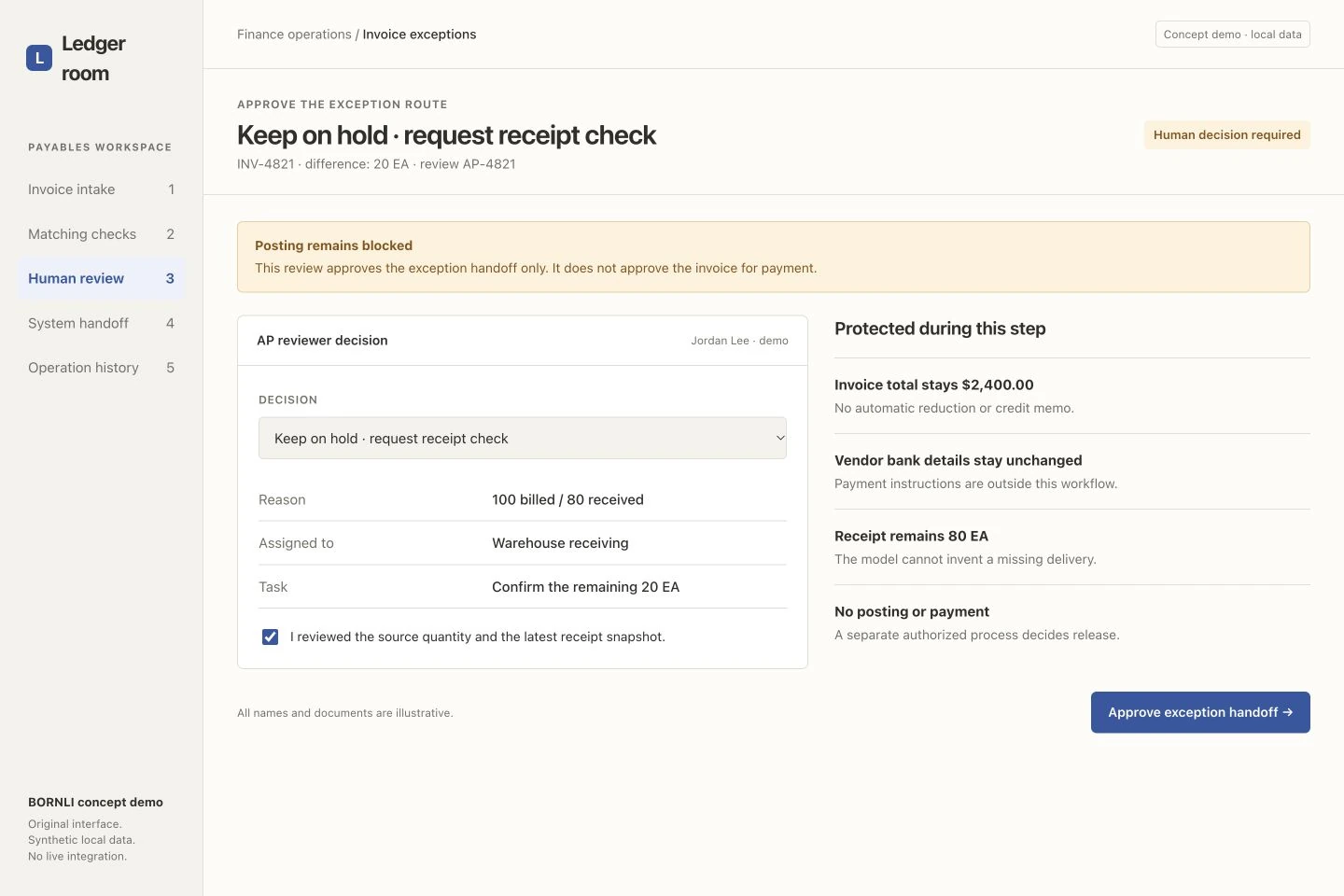
In the demo, AP reviewer Jordan Lee selects Keep on hold · request receipt check and assigns the exception to warehouse receiving. The task is to confirm the remaining 20 units. The reviewer must acknowledge checking the source and receipt before the local handoff proceeds.
The invoice stays at $2,400, the receipt stays at 80 and vendor bank details remain untouched. Approval covers the exception handoff only. Correcting a receipt, releasing an invoice for posting and approving payment require their own authorized process. The concept does not prescribe how a real disputed or partially received invoice should be paid.
Give reviewers a way to return an incorrect extraction rather than approving it just to clear the queue. Record the decision, reason, reviewer and source revision. If the underlying invoice or receipt changes, make the previous approval stale and request a new review before the corresponding write.
A timed-out request is still unconfirmed.
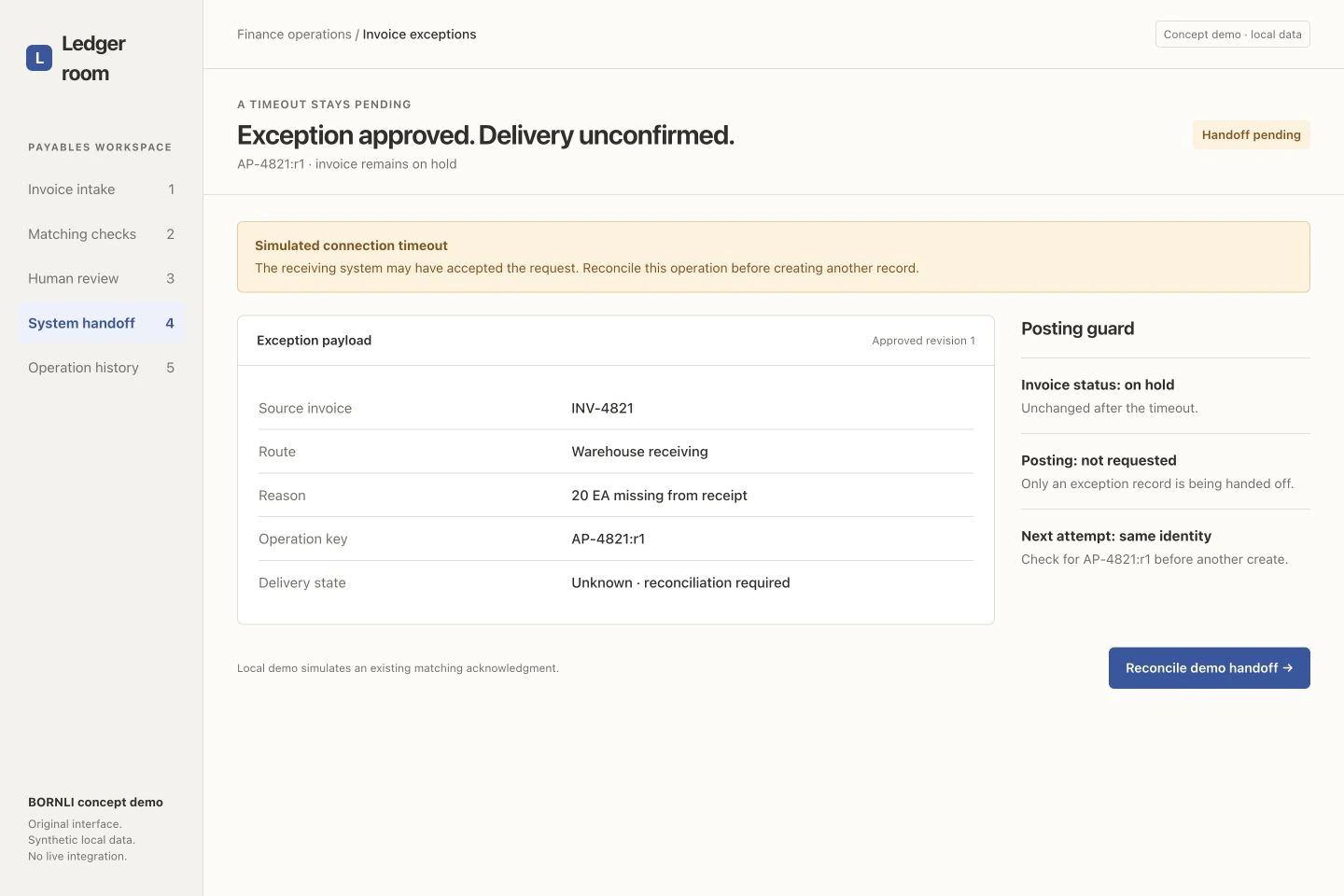
The next state deliberately simulates a connection timeout. Operation AP-4821:r1 has been approved, but delivery is unknown. The invoice remains on hold; the interface does not claim that a receiving task has definitely been created.
The real adapter must reconcile that same operation before issuing another create. Use the receiving system's supported identity or duplicate-prevention mechanism and keep the acknowledgment. A timeout may follow an accepted request, so simply creating another task can duplicate the work. Verify this behavior against the actual API; a local retry counter is not proof of delivery.
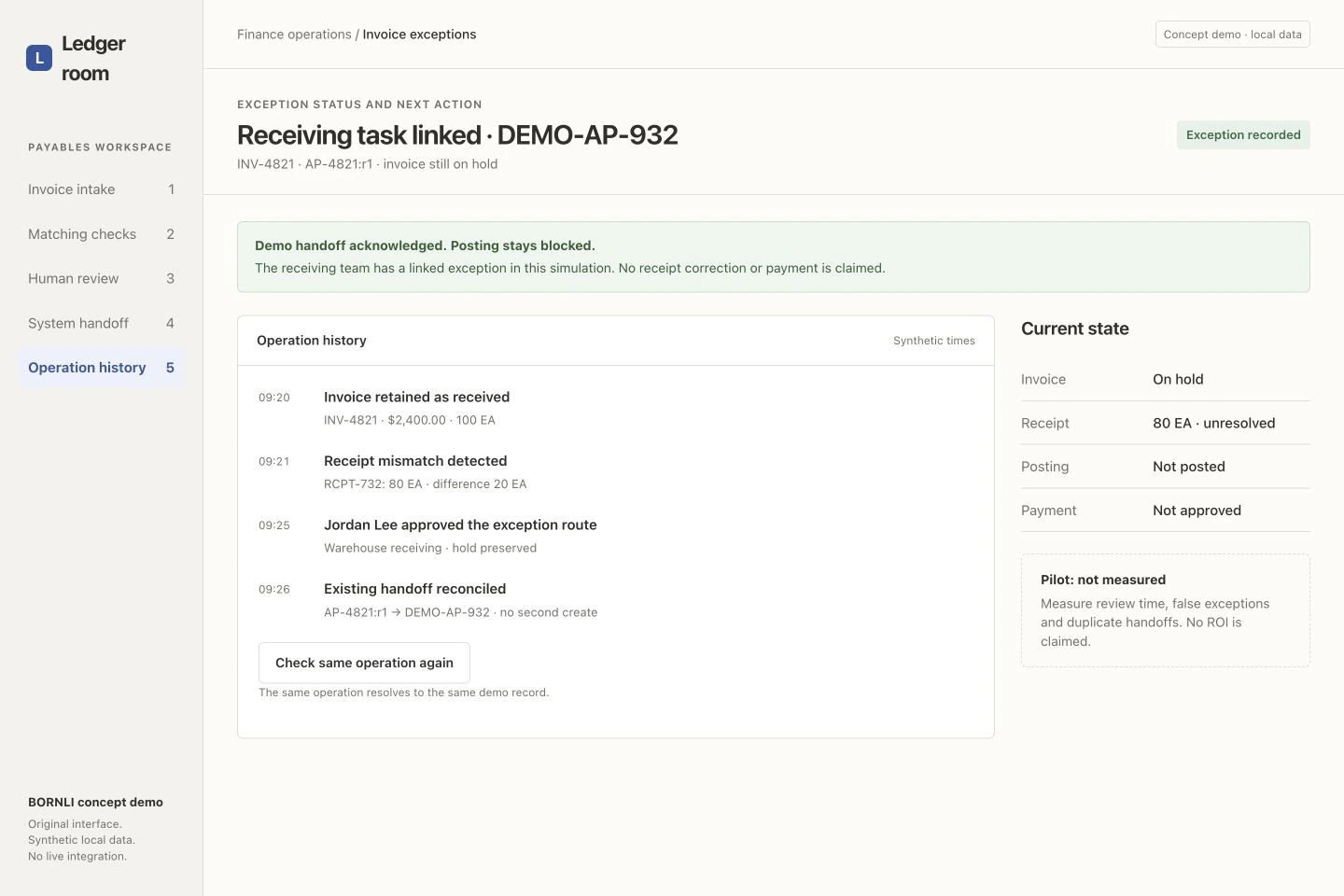
In our local simulation, reconciliation finds acknowledgment DEMO-AP-932 for the same operation. No second task is created. The screen demonstrates the intended state transition, not a deployed integration.
An exception record is not a resolved invoice.
The final state links the receiving task and preserves the review history. The receipt remains unresolved at 80 units, the invoice is on hold and no posting or payment is approved. Acknowledgment means the exception record was accepted in the demo; it does not mean the missing goods arrived.
Keep those milestones separate in a live workflow: source received, discrepancy reviewed, task acknowledged, receipt corrected, invoice released and payment authorized. Otherwise a reassuring “Done” badge can hide unfinished work. The intended benefit is less repeated document checking and clearer ownership; it still needs to be measured.
Test the exceptions that would otherwise fall between teams.
Start with one invoice stream, one ERP and one agreed review policy. Use anonymized historical invoice/PO/receipt sets with known decisions. Run proposals alongside the current process before enabling any automatic accounting write.
- Partial or missing receipt: show the unresolved quantity and route it to a named owner.
- Wrong unit or vendor match: return to review; do not force a plausible match.
- Repeated invoice or message: retain both sources and check for an existing operation before another task.
- Receipt changes after approval: require review of the new source state.
- Timeout after acceptance: reconcile the existing handoff and retain its acknowledgment.
- Receiver rejects a field: expose the error and keep the invoice's original status.
Measure reviewer corrections, missed discrepancies, false exceptions, review time, aging and duplicate handoffs. Compare against the team's real baseline and separate waiting for a receipt from time spent checking documents. The demo's pilot is not measured; no ROI, error reduction or savings are claimed.
Bring anonymized documents, your ERP and receipt process, approved tolerance rules and a troublesome exception. Discuss invoice automation with BORNLI. For incoming customer purchase orders rather than supplier bills, use the separate AI order-processing guide.
Map the workflow before building it.
Tell us what your team handles manually, which tools you use, and where the process gets stuck. Start by email.
Discuss your workflow ↗