BORNLI / product decisions
AI CRM integration with human approval
Keep your CRM current with reviewed, traceable updates: match the existing contact, approve specific fields and confirm the result.
AI / revenue operations
Let AI propose a change. Make the write deliberate.
AI CRM integration can turn account notes into suggested contact updates without asking the sales team to retype every field. A useful first scope is one source, one record type and a short list of permitted properties. Match the existing record, show the proposed change, get the required approval and retain the CRM acknowledgment.
This fits teams whose CRM falls behind their conversations. It does not fix unclear ownership or unreliable source data by itself. If the same few fields can already be updated through a dependable native workflow, start there.
Illustrative scenario: we built Contact desk as a local BORNLI concept demo. Sarah Chen, Acorn Industrial, the records and timings below are synthetic. The interface has working local states, but no live CRM connection or measured customer result.
Check the CRM before adding another system.
For example, HubSpot documents contact deduplication by email and company deduplication by domain. The behavior depends on the object and how data enters the CRM; it should not be treated as a universal guarantee for every integration. Its Contacts API also supports managing and synchronizing contact data.
Those capabilities answer whether data can move. The business still needs to decide which source wins, who may approve a change and what happens when identity is uncertain. Custom work makes sense when that specific review or connection is missing. The concept here is platform-neutral; the screens do not demonstrate an installed HubSpot integration.
Match the person before changing the record.
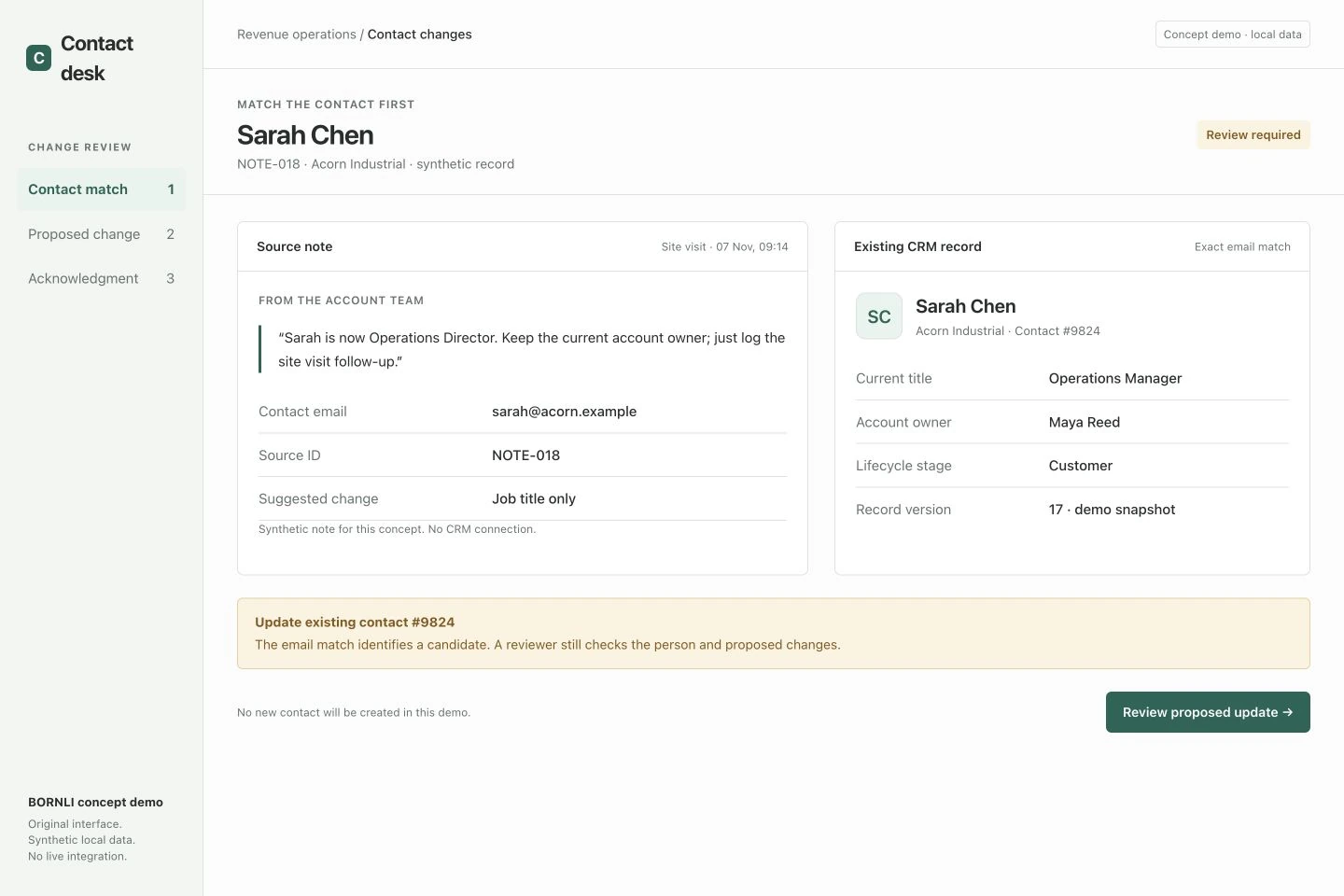
The synthetic note NOTE-018 says Sarah is now Operations Director and asks to keep the account owner. The demo finds existing contact #9824 using sarah@acorn.example. It presents that record for review rather than creating a second contact.
An email match is a candidate, not permission to overwrite everything. A shared inbox, changed address or two plausible people should remain unresolved until a reviewer selects the right record. Do not let a similar-looking name trigger an automatic merge. Keep the source identifier and the selected CRM record ID together so the decision can be traced later.
Approve a field-level change, not a whole rewritten profile.
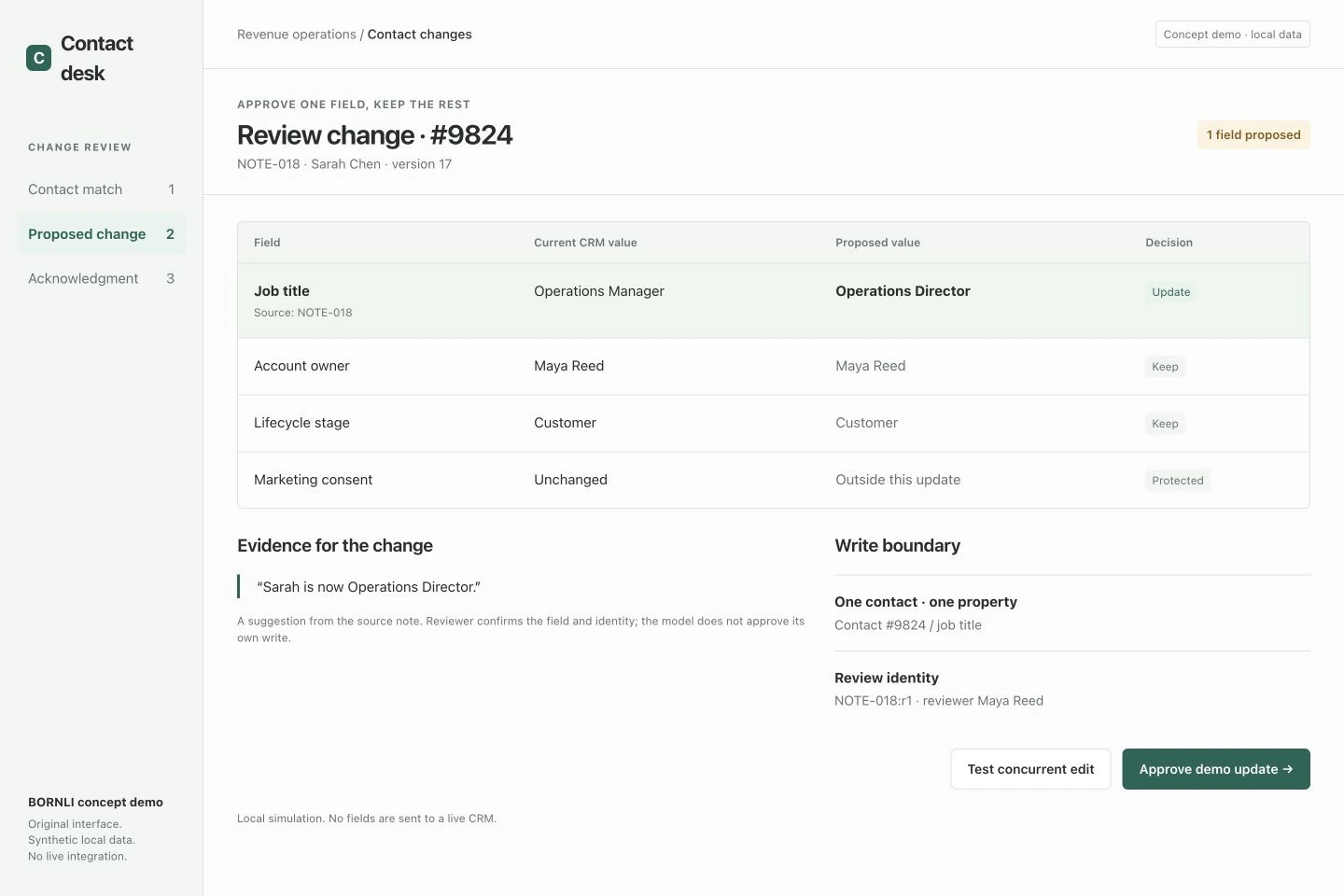
In the example, Operations Manager → Operations Director is the only proposed write. Maya Reed remains the account owner, the lifecycle stage stays Customer and marketing consent is protected. The source note supports the title change; it says nothing that authorizes a new sales stage or consent update.
| Input condition | Proposed pilot behavior |
|---|---|
| The source supports an allowed change | Show current value, proposed value and source for approval. |
| A value is missing from the note | Leave the CRM field untouched; missing is not a request to clear it. |
| The source conflicts with the current record | Keep both visible and require a decision. |
| The property is outside the agreed scope | Do not include it in the write, even if the model suggests it. |
The business owner should define this allowlist and the approval role before connecting the model. Limit the adapter's permissions accordingly. A reviewer needs enough context to reject a suggestion, not just an Accept button beside a confidence score.
Protect the interval between review and write-back.
Someone may edit the CRM while a proposed change is waiting. Recheck the relevant record before applying an approved update. If it no longer matches the reviewed snapshot, stop and return to review rather than overwriting the newer work. The demo includes a concurrent-edit state that blocks its approval button; this illustrates a requirement, not a proven atomic update in any particular CRM.
Use a stable operation identity for a reviewed revision, such as NOTE-018:r1. If a connection times out after submission, the write may already have been accepted. Reconcile the saved operation and receiving-system state before retrying. Verify the real API's capabilities; local bookkeeping alone cannot guarantee exactly-once effects, especially if CRM workflows react to updates.
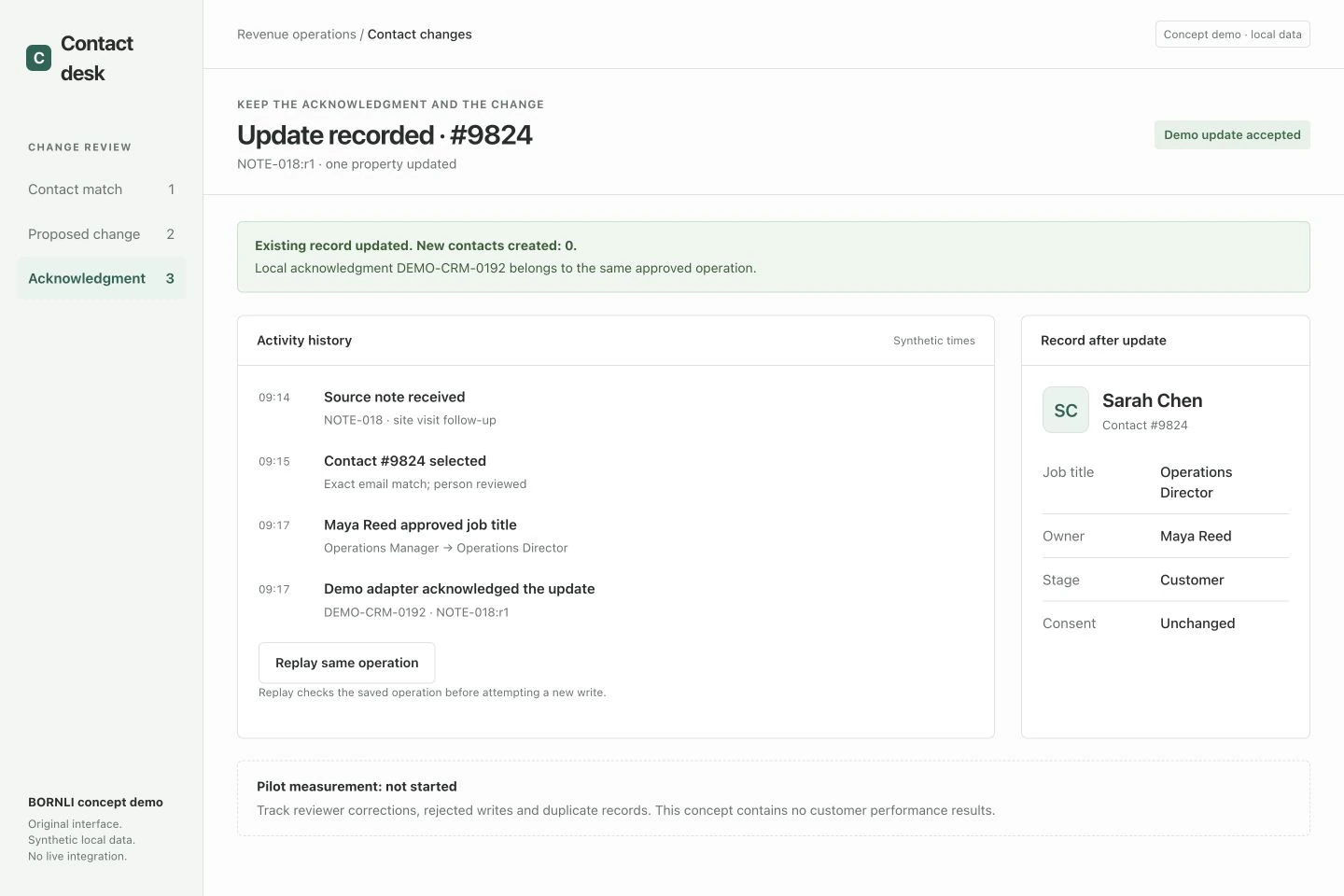
The final demo shows acknowledgment DEMO-CRM-0192 for the same contact and operation. Replaying it returns the saved local result instead of creating a new write. This is a testable integration behavior to implement, not evidence that a live connector exists.
Judge the pilot by trustworthy updates, not generated summaries.
Use anonymized historical notes and a test CRM first. Include a missing email, shared address, conflicting title, already-correct record, concurrent edit, rejected write and timeout after acceptance. Verify that protected fields remain unchanged and repeated operations do not generate extra records or workflow side effects.
Measure reviewer corrections, mistaken matches, unapproved changes and time spent reviewing against the current manual process. Count integration failures separately from extraction errors. The demo's pilot measurement is not started; no saving, accuracy rate or lead uplift has been measured.
The first deliverable should be a bounded workflow your team can inspect: source → selected record → approved fields → confirmed result. Bring a few anonymized notes, the CRM and plan you use, allowed fields and an example of a bad update. Discuss a CRM automation with BORNLI. If the earlier problem is deciding who receives a new sales message, see AI inquiry routing; that is a separate task from writing to an existing customer record.
Map the workflow before building it.
Tell us what your team handles manually, which tools you use, and where the process gets stuck. Start by email.
Discuss your workflow ↗