BORNLI / product decisions
AI submittal review with the source beside every finding
Use AI to prepare source-linked comparisons between a product submittal and a defined specification revision. A project engineer reviews the findings before they enter the formal approval workflow.
Use AI for a traceable first comparison
AI-assisted construction submittal review can help a project engineer compare product data with a defined specification and prepare source-linked comments. A sensible first scope is pre-review for one trade package. The system proposes findings; the project’s authorized reviewers retain technical and formal approval responsibilities.
In its Torcon customer story published March 12, 2026, Trunk Tools describes a pilot begun in August 2025 across two active projects. It reports 64 submittal reviews with approximately 43.5 minutes saved per review, or about 46 hours. The separate figure of 453 hours concerns TrunkText document Q&A in the first four full months. Those figures should not be combined into a submittal-only result.
This is a vendor-reported case, checked on November 16, 2026, not an independent audit. The page does not provide a detailed timing method for the 64 reviews. It establishes a concrete use case, not a BORNLI result or a forecast for another contractor. Our proposed workflow below addresses the comparison and comment handoff, rather than offering a general chatbot for all project documents.
Pin the documents before asking for a finding
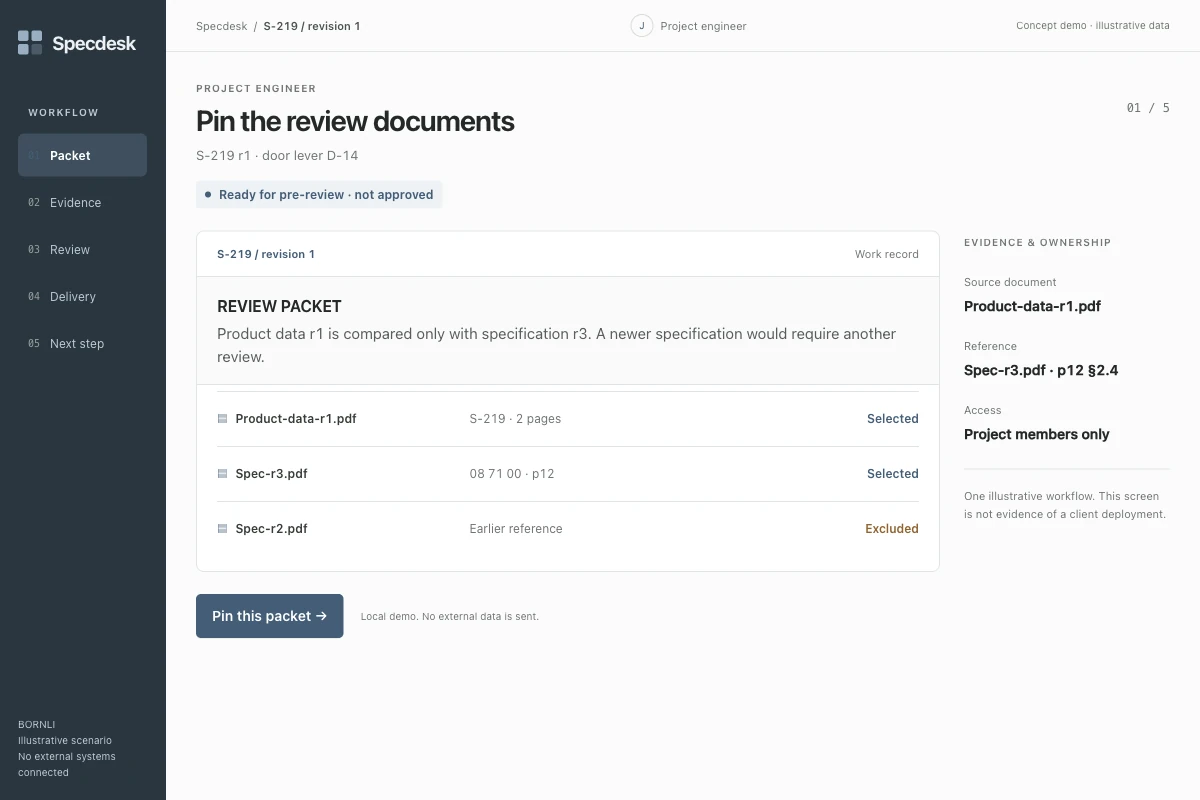
BORNLI concept demo — illustrative scenario. Submittal S-219 revision 1 contains product data for door lever D-14. The reviewer compares it with specification section 08 71 00, revision 3, page 12, item 2.4. The documents, item and requirements are fictional; they demonstrate a review mechanism rather than a construction recommendation.
The input screen names both revisions and excludes the older specification revision 2. A review should record the exact source files, not just a folder called “latest.” If the reference changes while the engineer is reviewing, show that conflict and ask for a new comparison where it affects the findings.
For a bounded pilot, choose supported PDF product data and specifications that the team has permission to use. Keep access limited to the project’s allowed readers. Scanned or poorly extracted pages need an uncertainty state and access to the original, rather than a confident result assembled from broken text.
Show the requirement and the evidence together
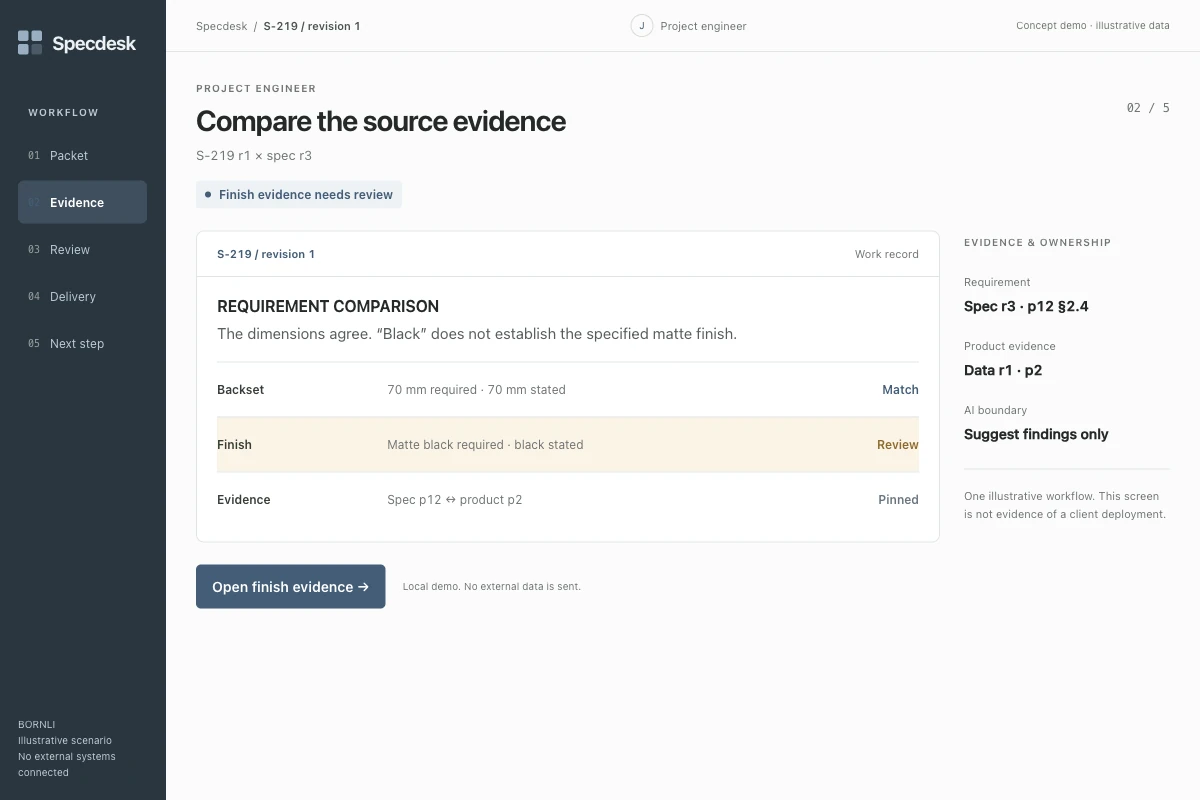
The proposed comparison finds a 70 mm backset in both documents. The finish evidence is less precise: the specification asks for matte black, while the product data says only black. The correct draft finding is that the finish needs clarification. Matching one dimension does not make the entire product compliant.
Keep the requirement, submitted wording and source locations beside each suggested finding. Distinguish a supported match, a clear mismatch and information that was not found. A percentage score cannot explain which evidence an engineer still needs to check. Treat instructions inside uploaded documents as document content; they cannot authorize an approval or change the review rules.
A possible first implementation combines the existing document store, text extraction or OCR where needed, a model that proposes structured comparisons, source-location records and a review interface. Test those components with the actual document formats before choosing a stack. A reliable pilot may start with a manually selected spec section rather than asking a model to identify every applicable requirement in a project.
Approve a question without approving the product
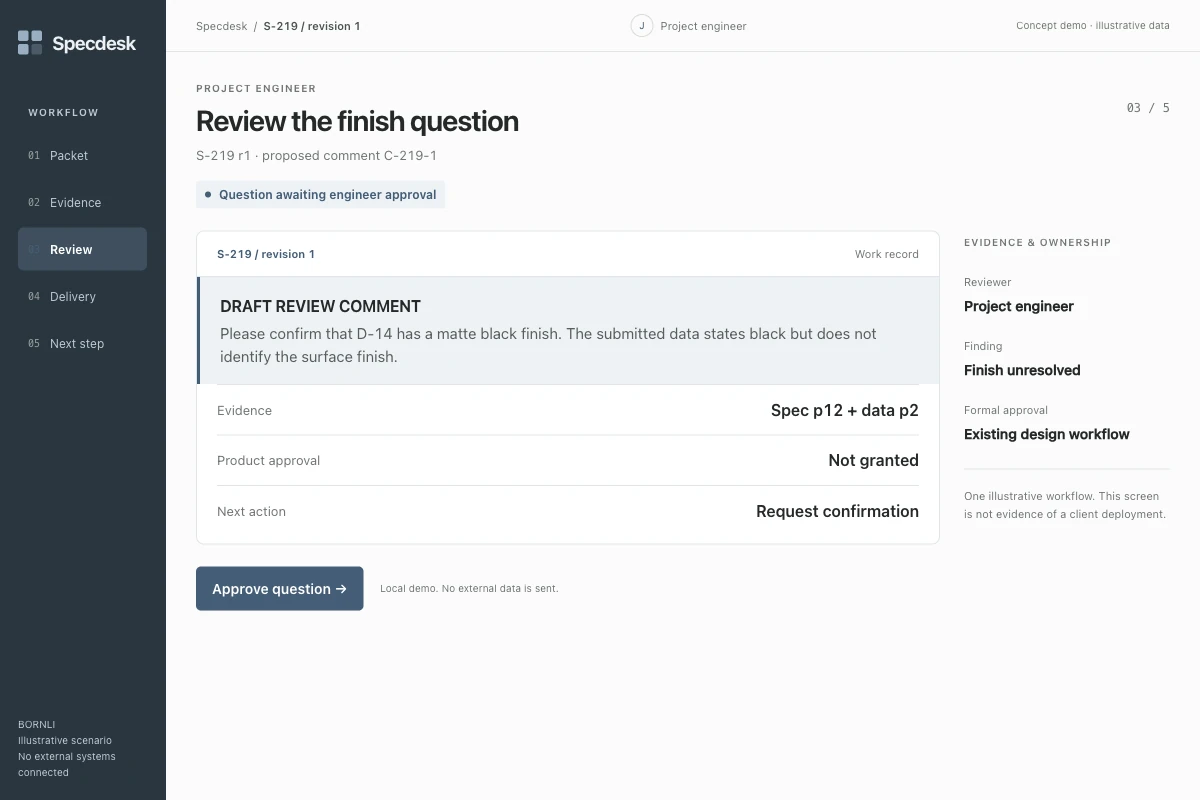
The engineer opens specification page 12 and product-data page 2. The draft comment asks the submitter to confirm the matte black finish. The reviewer can edit it, reject the finding or approve that question for the comment package. In the concept, the missing finish detail remains unresolved.
Label the action precisely. “Approve question” means that the comment is ready for handoff; it does not approve the hardware, certify compliance or release an order. The team should decide which findings need a specialist and which can be handled by the project engineer. AI confidence should not expand a reviewer’s authority.
Keep the human decision, source versions and final wording together. If someone replaces the product sheet after the comment is approved, mark the affected finding for review. Do not silently reuse the approval against a different document.
Keep the existing submittal workflow in control
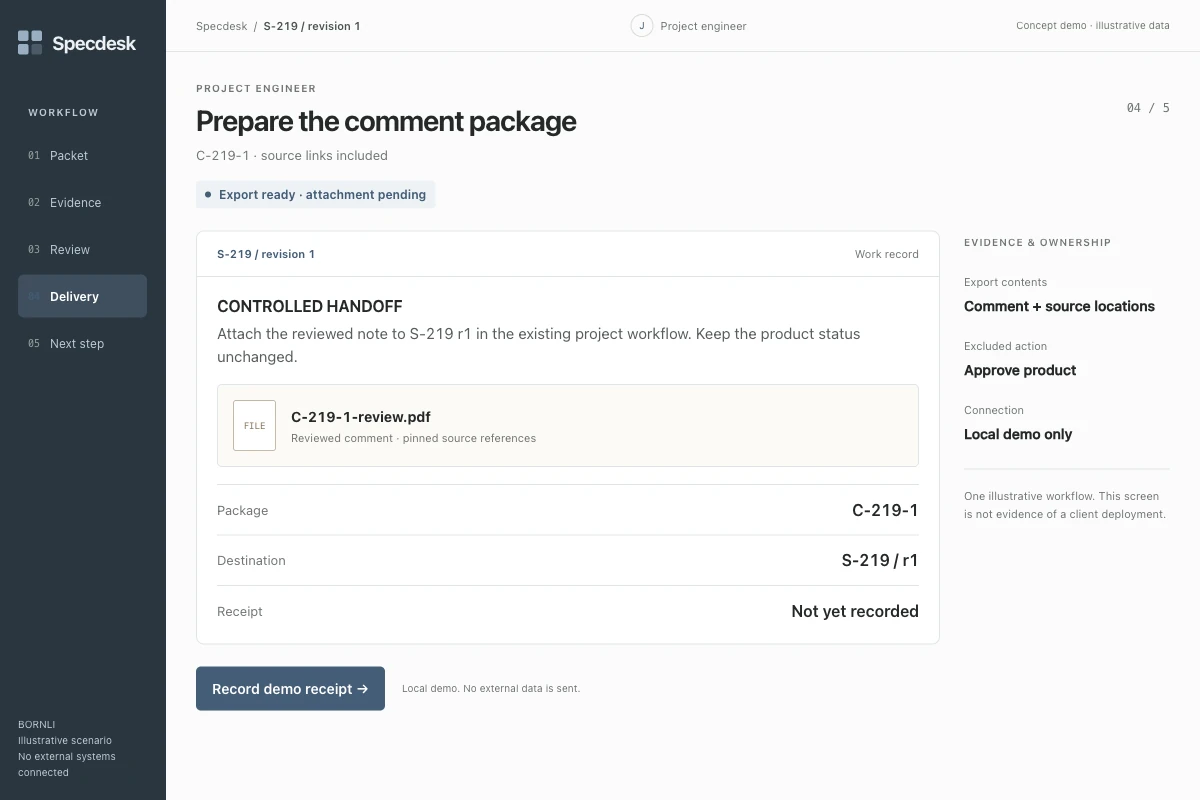
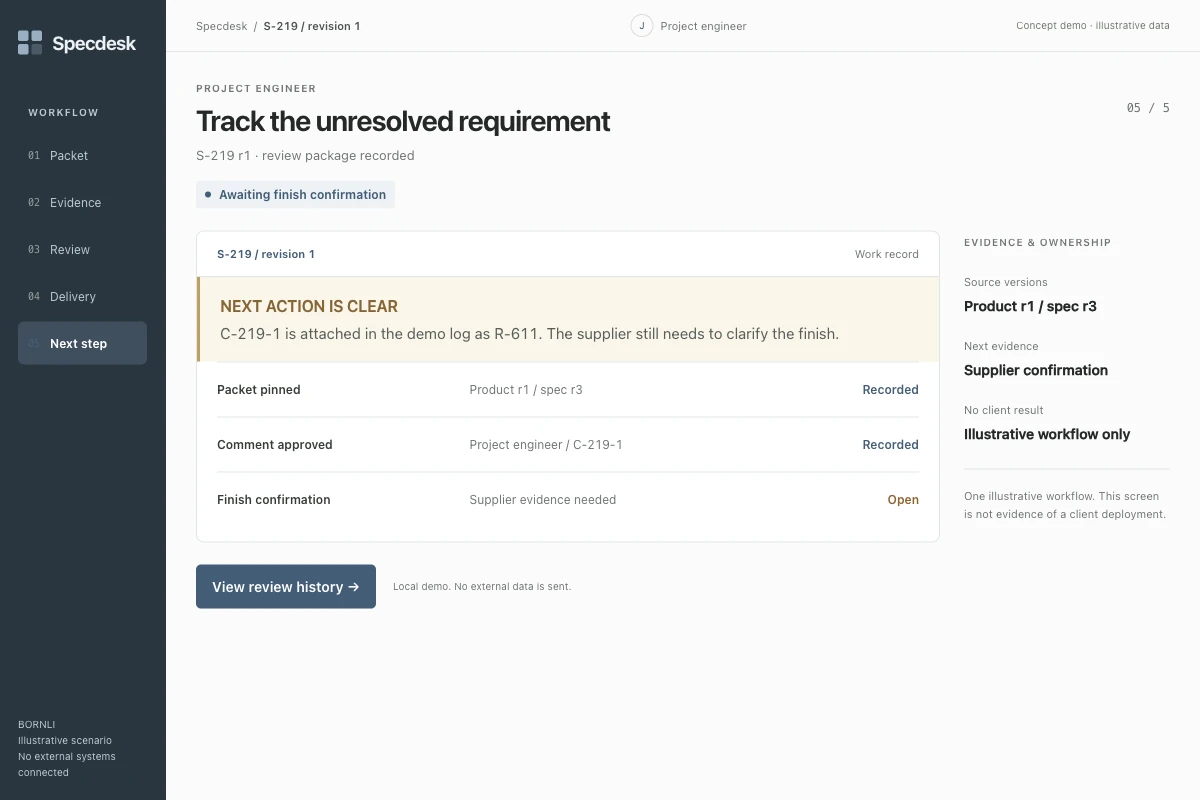
The reviewed comment becomes package C-219-1, with source locations and the pinned versions. A practical first handoff is a comment sheet that a coordinator attaches to S-219 revision 1 in the existing project system. It does not change the formal product approval status.
Procore’s revision documentation, checked November 16, 2026, says new revisions are created from the current revision. It also notes that attachments are not carried over automatically and describes separate submitter and approver roles. That is product documentation, not proof that a particular API integration is available for your account.
The handoff screen therefore starts with “attachment pending.” The concept’s local action records illustrative receipt R-611 for C-219-1; it does not contact Procore or any other external service. Before automating the handoff, validate permissions, the intended destination revision and a way to reconcile a lost reply. A repeated operation should find the original package or require review, not distribute another contradictory comment.
Make the remaining decision visible
The useful result is a traceable review note: C-219-1 has a receipt, and the finish still needs confirmation. The outcome screen does not turn a completed AI task into an approved product. It shows what the next person needs to supply and which source versions support the current comment.
A revised product packet or supplier clarification starts a fresh evidence check. The existing approval workflow then handles the business decision. This boundary keeps the automation useful even when it cannot resolve a requirement itself.
Measure review quality as well as time
Choose one trade package, a fixed reference set and an engineer who can review the test findings. Include clear matches, missing information, contradictions, changed revisions, scanned pages and an ambiguous handoff. Use examples with known issues as well as ordinary packets; an easy sample can hide a weak review process.
Measure missed requirements, unsupported findings, reviewer corrections and total time to produce a usable comment package. Include the time spent checking sources and repairing extraction errors. Track duplicate handoffs separately. Set acceptance thresholds with the team before running the test.
No BORNLI deployment, savings or engineering outcome is claimed for these concept screens. The Torcon figures describe a different implementation. To scope your own pilot, bring a redacted specification section, a few product submittals, the current review route and the target project system. The AI workflow pilot guide explains how to turn that material into a bounded first release.
Map the workflow before building it.
Tell us what your team handles manually, which tools you use, and where the process gets stuck. Start by email.
Discuss your workflow ↗